
4 Kick off boot
4.1 Jumper settings
For the board to perform a boot from the (Micro)SD card, modifications in the jumper settings need to be made. The settings are detailed for each of the boards below.
4.1.1 Zedboard
The correct setting is depicted in the image on the following page.
Typically, the following jumper changes are necessary (but your board may be set differently to begin with):
-
Install a jumper for JP2 to supply 5V to USB device.
-
Move JP10 and JP9 from GND to 3V3 position; leave the other three in that row connected to GND.
-
Install a jumper for JP6 (required for CES silicon, see page 34 of the Zedboard’s Hardware Guide).
IMPORTANT:
The required setting differs from the one detailed in the Zedboard Hardware User Guide in that JP2 is jumpered, so that the USB
devices attached to the board (USB keyboard and mouse) receive their 5V power supply.
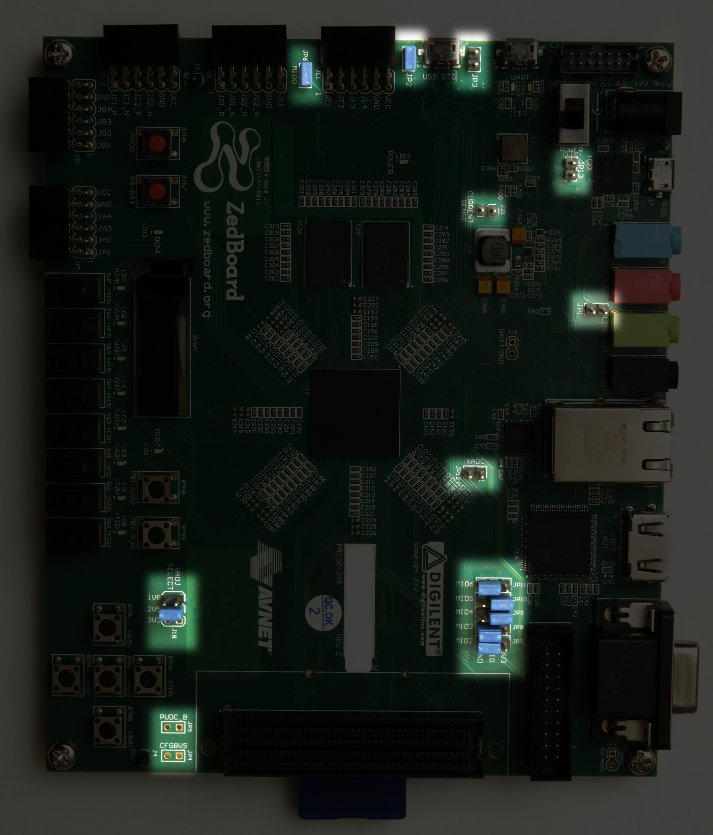
Jumper settings highlighted on the Zedboard
4.1.2 MicroZed
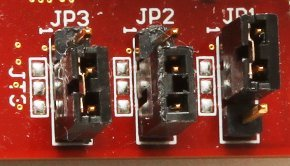
The proper jumper setting to perform boot of Xillinux from the MicroSD card is as follows:
-
JP1: 1-2 (GND)
-
JP2: 2-3 (VCC)
-
JP3: 2-3 (VCC)
Given a board with the default setting, only JP2 needs to be moved.
The correct jumper setting is depicted here:
4.1.3 Zybo
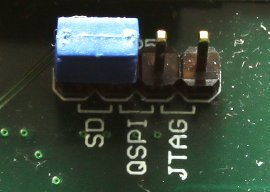
The boot mode is selected by a jumper near the VGA connector, which should be set on the two pins marked with “SD”, as shown in this image:
The other jumpers are set depending on the desired operating mode. For example, the power supply jumper can be set to take power from an external 5V source, or from the UART USB jack – both are fine for a successful boot of Xillinux.
4.1.4 Z-Turn Lite
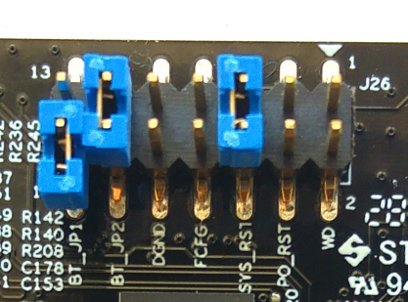
The jumpers next to the Ethernet connector (labeled J26) determine the boot mode, and should be set up as follows:
-
The BT_JP1 jumper should not be placed (or placed as shown in the picture, i.e. attached to only one of the pins)
-
The BT_JP2 jumper should be placed
-
FCFG and PO_RST should not be placed
Unrelated to the boot operation, these two jumpers are of some importance:
-
The SYS_RST jumper makes it possible to reset the Zynq’s processor by pushing the board’s K2 button.
-
The WD (Watchdog) jumper allows enabling the on-board watchdog chip from the processor. Xillinux carries out boot properly regardless of whether it’s placed or not.
The DGND pin pair is just two pins connected to ground. Placing a jumper on these has no effect.
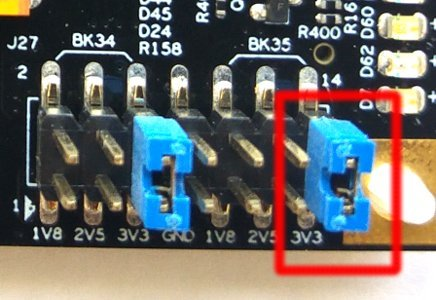
Also, if the HDMI video output is used (via the Cape IO board), the Zynq device’s bank 35 must be driven with a 3.3V voltage supply. This is established with the 3V3 jumper on the BK35 group of J27, at the board’s corner close to the MicroSD card (see image below).
4.2 Attaching peripherals
The following general-purpose hardware can be attached to the board:
-
Z-Turn Lite with a Z-Turn Lite IO Cape board: A computer monitor to the Cape IO board’s HDMI connector. Alternatively, a DVI input connected to the board’s HDMI plug through an HDMI/DVI adapter or cable.
-
Zedboard / Zybo: A computer monitor to the analog VGA connector.
-
Zybo: A computer monitor with an HDMI input. Alternatively, a DVI input connected to the board’s HDMI plug through an HDMI/DVI adapter or cable.
-
Zedboard/Zybo/Z-Turn Lite: A mouse and keyboard to the USB (OTG) connector.
On Zybo, there’s a PC-like USB plug for this. On Zedboard and Z-Turn Lite, this goes through the USB female cable that comes with the Zedboard (which is the shorter one). This cable is also shipped with Z-Turn Lite when purchased in the “kit” configuration.
The system will carry out a successful boot in the absence of these, and there is no problem connecting and disconnecting the keyboard and mouse as the system runs – the system detects and works with whatever keyboard and mouse it has connected at any given moment.
Note that on Zedboard, JP2 must be installed for this USB port to function.
-
The Ethernet port is optional for common network tasks. The Linux machine configures the network automatically if the attached network has a DHCP server.
-
The UART USB port can be connected to a PC, but this is not necessary in most cases with Zedboard and Zybo. Some boot messages are sent there, and a shell prompt is issued on this interface when the boot completes.
This is useful for debugging failures during boot, or when either a PC monitor or a keyboard is missing or not working properly.
For Z-Turn Lite, an external USB adapter is required for interfacing with the board’s 3.3V UART signals. This adapter is possibly included with the board, as explained on Xillybus’ web page regarding Z-Turn Lite.
4.3 Powering up the board
4.3.1 Initial diagnostics
Failures during boot are rare when the build instructions above have been followed. Among the common reasons are:
-
Incorrect jumper settings (see paragraph 4.1).
-
Using a (Micro)SD card not made by SanDisk. Even if the card seems to work fine, scattered data corruption is easily overlooked, but results in errors that appear to have a completely different reason.
-
Incomplete or faulty writing of the (Micro)SD image into the card
-
Old and inadequate environment variables loaded by U-boot from the board’s QSPI flash. See paragraph 4.3.3.
-
Not following the instructions, usually due to attempts to tweak the system on the first attempt to build it.
The correct UART setting is 115200 baud, 8 data bits, 1 stop bit, and no flow control. Some text should appear no later than 4 seconds after the board is powered on. The only requirement for this to happen is that the boot.bin file is found in the first (FAT32) partition on the (Micro)SD card.
If nothing happens after powering on the board:
-
Verify that the correct boot.bin has been copied from a boot partition kit that matches the board’s type. The kit’s file name indicates which board it should be used with.
-
Verify that the UART to computer link works properly, possibly with the sample Linux on the QSPI flash or on the SD card that (possibly) arrived with the board. Note that Linux, as a host for the UART terminal application, may not work properly with some UART/USB converters, so trying Tera Term under Windows may be the only option.
If U-boot emits messages on the console, but the boot process fails, it may be helpful to compare with the transcript in paragraph 4.3.5. The rest of this section may also contain relevant information for understanding what’s wrong.
4.3.2 When the boot process completes
At the end of the boot process, a shell prompt is given on the UART console, with no need to log in manually. Even so, the root user’s password is set to nothing, so logging in as root, if ever needed, doesn’t require a password.
IMPORTANT:
Unlike the Linux sample on the (Micro)SD card that came with the board, Xillinux’ root file system permanently resides on the
(Micro)SD card, and is written to while the system is up. The Linux system should be shut down properly before powering off the board to
keep the system stable, just like any PC computer, even though a proper recovery is usually observed after sudden power
losses.
Notes for Z-Turn Lite, Zedboard and Zybo:
-
Type “startx” at shell prompt to launch a LXDE graphical desktop. The desktop takes some 15-30 seconds to initialize. If nothing appears to happen, monitoring the activity meter on the OLED display helps tell if something is going on (Only Zedboard has this OLED display).
-
The Xillybus logo screensaver with a white background is present on the screen from the moment the logic fabric is loaded until the Linux kernel launches. It will also show when the operating system puts the screen in “blank” mode, which is a normal condition when the system is idle, or when the X-Windows system attempts to manipulate the graphic mode.
-
A Xillybus screensaver on blue background, or random blue stripes on the screen indicate that the graphics interface suffers from data starvation. This is never expected to happen, and should be reported, unless an obvious reason is known.
4.3.3 U-boot environment variables
Xillinux relies on U-boot for loading xillydemo.bit, the kernel image and the device tree during the boot process. This utility offers a large variety of boot configurations, and has a simple command-line interface which allows experimentation and modification of the settings.
U-boot’s shell is reached by typing any character on the UART console immediately after U-boot starts:
U-Boot 2013.07 (Mar 15 2014 - 22:59:21)

Memory: ECC disabled
DRAM: 512 MiB
MMC: zynq_sdhci: 0
SF: Detected S25FL129P_64K/S25FL128S_64K with page size 64 KiB, total 16 MiB
*** Warning - bad CRC, using default environment

In: serial
Out: serial
Err: serial
Net: Gem.e000b000
Hit any key to stop autoboot: 1
U-boot always attempts to retrieve saved environment variables from the QSPI flash. The warning that says “bad CRC” indicates that no valid data was found, so U-boot reverts to its hardcoded default environment. This is not an error for a boot of Xillinux from the (Micro)SD card, because the Xillinux’ U-boot has all environment variables set correctly.
IMPORTANT:
Note that even when the system executes a boot from a (Micro)SD card, the environment variables are taken from the QSPI flash on
the board itself. If the QSPI flash contains environment variables matching a different boot scenario, U-boot may fail the boot process,
relying on inadequate variables.
When no key is pressed for one second, U-boot continues according to its environment variables (those loaded from the QSPI flash, or the hardcoded default settings). More precisely, it executes the content of the “bootcmd” variable, which says “run $modeboot” by default. “modeboot”, in turn, is set dynamically by U-boot, depending on where U-boot was loaded from, so it says “sdboot” on a regular Xillinux boot. The “sdboot” variable contains a series of commands for carrying out the boot process of Xillinux.
U-boot’s command-line shell has a “help” command, which lists all commands and their meaning. Some useful commands are
-
help command – show help on command
-
env print – print all environment variables’ current values
-
env set – set a certain environment variable’s value
-
env default -a – set all environment variables to their hardcoded defaults.
-
saveenv – save the current environment variables to QSPI flash (not to MicroSD/SD card).
In particular, the last two commands in the list are important when U-boot fails the boot process. If the warning that says “bad CRC, using default environment” is not issued by U-boot, it’s relying on stored variables. In order to use the default variables (which are correct for Xillinux), go
xillinux-uboot> env default -a
## Resetting to default environment
xillinux-uboot> saveenv
Saving Environment to SPI Flash...
SF: Detected S25FL129P_64K/S25FL128S_64K with page size 64 KiB, total 16 MiB
Erasing SPI flash...Writing to SPI flash...done
If there were any desirable changes in the stored environment variables, they are erased as well, of course.
4.3.4 Setting a custom Ethernet MAC address
By default, Linux relies on the Ethernet MAC address that U-boot sets.
In order to change the MAC address, it is possible to add a configuration file that is read by the Network Manager. For example, copy the following into a file named /etc/NetworkManager/system-connections/eth0:
[connection]
id=eth0
type=ethernet

[ethernet]
cloned-mac-address=00:11:22:33:44:55
mac-address=00:0A:35:00:01:22
It is necessary to change this file’s permissions so that Network Manager will trust the configuration:
# cd /etc/NetworkManager/system-connections/
# chmod 0600 eth0
Except for “eth0”, there should be no other file in this directory. If there are other files, delete them.
When Linux is restarted, the MAC address will be 00:11:22:33:44:55.
It is also possible to perform the same task with the help of the command-line utility “nmcli”. It’s, however, easier to do this on the graphical desktop: Click on the Network Manager’s icon at the desktop’s bottom right. This icon looks like an Ethernet plug that is connected to the wall. Select “Edit Connections...” and then select “Wired connection 1” and click “Edit”. Write the new MAC address next to where it says “Cloned MAC address” and then click “Save”. The new MAC address will be used after Linux is restarted.
An alternative method is to change one of U-boot’s environment variables. Note that this method will not work on some versions of Xillinux, because U-boot doesn’t always have access to the QSPI flash, and consequently the “saveenv” command is not always supported.
Since the environment variables are stored on the QSPI flash, the MAC address is persistently bound to the hardware. This is different from the previous method, where the MAC address is bound to the (Micro)SD card.
For example, in U-boot’s shell using the USB UART console:
xillinux-uboot> set ethaddr 00:11:22:33:44:55
xillinux-uboot> saveenv
Saving Environment to SPI Flash...
Erasing SPI flash...Writing to SPI flash...done
Later on, after recycling the board’s power, and letting Linux perform boot automatically:
root@localhost:~# ifconfig
eth1   Link encap:Ethernet HWaddr 00:11:22:33:44:55
     inet addr:10.1.1.164 Bcast:10.1.1.255 Mask:255.255.255.0
     inet6 addr: fe80::211:22ff:fe33:4455/64 Scope:Link
     UP BROADCAST RUNNING MULTICAST MTU:1500 Metric:1
     RX packets:16 errors:0 dropped:0 overruns:0 frame:0
     TX packets:50 errors:0 dropped:0 overruns:0 carrier:0
     collisions:0 txqueuelen:1000
     RX bytes:2720 (2.7 KB) TX bytes:9230 (9.2 KB)
     Interrupt:54 Base address:0xb000
(The IP address was given by the DHCP server in the case above)
4.3.5 Sample transcript during boot
For reference, a typical UART transcript during boot is given below. The example is shown for Zedboard, but the differences between the boards are minor. If the boot process fails, an error message will probably indicate what stage went wrong, and possibly why.
U-Boot 2013.07 (Aug 10 2014 - 11:28:31)

Zynq PS_VERSION = 0
Memory: ECC disabled
DRAM: 512 MiB
MMC:    zynq_sdhci: 0
SF: Detected S25FL256S_64K with page size 64 KiB, total 32 MiB
In:     serial
Out:    serial
Err:    serial
Net:    Gem.e000b000
Hit any key to stop autoboot: 1 0
Device: zynq_sdhci
Manufacturer ID: 3
OEM: 5344
Name: SL08G
Tran Speed: 50000000
Rd Block Len: 512
SD version 3.0
High Capacity: Yes
Capacity: 7.4 GiB
Bus Width: 4-bit
Booting Xillinux...
reading xillydemo.bit
4045675 bytes read in 295 ms (13.1 MiB/s)
  design filename = "xillydemo.ncd;HW_TIMEOUT=FALSE;UserID=0xFFFFFFFF"
  part number = "7z020clg484"
  date = "2014/03/11"
  time = "22:22:00"
  bytes in bitstream = 4045564
zynq_load: Align buffer at 10006f to 100080(swap 1)
reading uImage
4487928 bytes read in 326 ms (13.1 MiB/s)
reading devicetree.dtb
9531 bytes read in 16 ms (581.1 KiB/s)
## Booting kernel from Legacy Image at 03000000 ...
    Image Name:   Linux-4.4.30-xillinux-2.0
    Image Type:   ARM Linux Kernel Image (uncompressed)
    Data Size:    4487864 Bytes = 4.3 MiB
    Load Address: 00008000
    Entry Point: 00008000
    Verifying Checksum ... OK
## Flattened Device Tree blob at 02a00000
    Booting using the fdt blob at 0x2a00000
    Loading Kernel Image ... OK
    Loading Device Tree to 1fb4e000, end 1fb5353a ... OK

Starting kernel ...

Uncompressing Linux... done, booting the kernel.
[    0.000000] Booting Linux on physical CPU 0x0
[    0.000000] Initializing cgroup subsys cpuset
[    0.000000] Initializing cgroup subsys cpu
[    0.000000] Initializing cgroup subsys cpuacct
[    0.000000] Linux version 4.4.30-xillinux-2.0 (eli@ocho.localdomain) (gcc version 4.7.3 (Sourcery CodeBench Lite 2013.05-40) ) #1 SMP PREEMPT Tue Dec 5 11:54:25 IST 2017 ()
[    0.000000] CPU: ARMv7 Processor [413fc090] revision 0 (ARMv7), cr=18c5387d
[    0.000000] CPU: PIPT / VIPT nonaliasing data cache, VIPT aliasing instruction cache
[    0.000000] Machine model: Xilinx Zynq
[    0.000000] bootconsole [earlycon0] enabled
[    0.000000] cma: Reserved 16 MiB at 0x1e800000
[    0.000000] Memory policy: Data cache writealloc
[    0.000000] PERCPU: Embedded 12 pages/cpu @dfb36000 s18880 r8192 d22080 u49152
[    0.000000] Built 1 zonelists in Zone order, mobility grouping on. Total pages: 129920
[    0.000000] Kernel command line: console=ttyPS0,115200n8 console=tty0 consoleblank=0 root=/dev/mmcblk0p2 rw rootwait earlyprintk
[    0.000000] PID hash table entries: 2048 (order: 1, 8192 bytes)
[    0.000000] Dentry cache hash table entries: 65536 (order: 6, 262144 bytes)
[    0.000000] Inode-cache hash table entries: 32768 (order: 5, 131072 bytes)
[    0.000000] Memory: 493232K/524288K available (6155K kernel code, 294K rwdata, 2192K rodata, 312K init, 472K bss, 14672K reserved, 16384K cma-reserved, 0K highmem)
[    0.000000] Virtual kernel memory layout:
[    0.000000]     vector : 0xffff0000 - 0xffff1000     (   4 kB)
[    0.000000]     fixmap : 0xffc00000 - 0xfff00000     (3072 kB)
[    0.000000]     vmalloc : 0xe0800000 - 0xff800000    ( 496 MB)
[    0.000000]     lowmem : 0xc0000000 - 0xe0000000     ( 512 MB)
[    0.000000]     pkmap   : 0xbfe00000 - 0xc0000000    (   2 MB)
[    0.000000]     modules : 0xbf000000 - 0xbfe00000    ( 14 MB)
[    0.000000]       .text : 0xc0008000 - 0xc082f0c4    (8349 kB)
[    0.000000]       .init : 0xc0830000 - 0xc087e000    ( 312 kB)
[    0.000000]       .data : 0xc087e000 - 0xc08c7840    ( 295 kB)
[    0.000000]        .bss : 0xc08c7840 - 0xc093da38    ( 473 kB)
[    0.000000] Preemptible hierarchical RCU implementation.
[    0.000000]         Build-time adjustment of leaf fanout to 32.
[    0.000000]         RCU restricting CPUs from NR_CPUS=4 to nr_cpu_ids=2.
[    0.000000] RCU: Adjusting geometry for rcu_fanout_leaf=32, nr_cpu_ids=2
[    0.000000] NR_IRQS:16 nr_irqs:16 16
[    0.000000] slcr mapped to e0800000
[    0.000000] L2C: platform modifies aux control register: 0x72360000 -> 0x72760000
[    0.000000] L2C: DT/platform modifies aux control register: 0x72360000 -> 0x72760000
[    0.000000] L2C-310 erratum 769419 enabled
[    0.000000] L2C-310 enabling early BRESP for Cortex-A9
[    0.000000] L2C-310 full line of zeros enabled for Cortex-A9
[    0.000000] L2C-310 ID prefetch enabled, offset 1 lines
[    0.000000] L2C-310 dynamic clock gating enabled, standby mode enabled
[    0.000000] L2C-310 cache controller enabled, 8 ways, 512 kB
[    0.000000] L2C-310: CACHE_ID 0x410000c8, AUX_CTRL 0x76760001
[    0.000000] zynq_clock_init: clkc starts at e0800100
[    0.000000] Zynq clock init
[    0.000000] clocksource: ttc_clocksource: mask: 0xffff max_cycles: 0xffff, max_idle_ns: 537538477 ns
[    0.000018] sched_clock: 16 bits at 54kHz, resolution 18432ns, wraps every 603975816ns
[    0.007925] ps7-ttc #0 at e0808000, irq=17
[    0.012173] sched_clock: 64 bits at 333MHz, resolution 3ns, wraps every 4398046511103ns
[    0.020052] clocksource: arm_global_timer: mask: 0xffffffffffffffff max_cycles: 0x4ce07af025, max_idle_ns: 440795209040 ns
[    0.031309] Console: colour dummy device 80x30
[    0.035629] console [tty0] enabled
[    0.039067] bootconsole [earlycon0] disabled
[    0.000000] Booting Linux on physical CPU 0x0
[    0.000000] Initializing cgroup subsys cpuset
[    0.000000] Initializing cgroup subsys cpu
[    0.000000] Initializing cgroup subsys cpuacct
[    0.000000] Linux version 4.4.30-xillinux-2.0 (eli@ocho.localdomain) (gcc version 4.7.3 (Sourcery CodeBench Lite 2013.05-40) ) #1 SMP PREEMPT Tue Dec 5 11:54:25 IST 2017 ()
[    0.000000] CPU: ARMv7 Processor [413fc090] revision 0 (ARMv7), cr=18c5387d
[    0.000000] CPU: PIPT / VIPT nonaliasing data cache, VIPT aliasing instruction cache
[    0.000000] Machine model: Xilinx Zynq
[    0.000000] bootconsole [earlycon0] enabled
[    0.000000] cma: Reserved 16 MiB at 0x1e800000
[    0.000000] Memory policy: Data cache writealloc
[    0.000000] PERCPU: Embedded 12 pages/cpu @dfb36000 s18880 r8192 d22080 u49152
[    0.000000] Built 1 zonelists in Zone order, mobility grouping on. Total pages: 129920
[    0.000000] Kernel command line: console=ttyPS0,115200n8 console=tty0 consoleblank=0 root=/dev/mmcblk0p2 rw rootwait earlyprintk
[    0.000000] PID hash table entries: 2048 (order: 1, 8192 bytes)
[    0.000000] Dentry cache hash table entries: 65536 (order: 6, 262144 bytes)
[    0.000000] Inode-cache hash table entries: 32768 (order: 5, 131072 bytes)
[    0.000000] Memory: 493232K/524288K available (6155K kernel code, 294K rwdata, 2192K rodata, 312K init, 472K bss, 14672K reserved, 16384K cma-reserved, 0K highmem)
[    0.000000] Virtual kernel memory layout:
[    0.000000]     vector : 0xffff0000 - 0xffff1000     (   4 kB)
[    0.000000]     fixmap : 0xffc00000 - 0xfff00000     (3072 kB)
[    0.000000]     vmalloc : 0xe0800000 - 0xff800000    ( 496 MB)
[    0.000000]     lowmem : 0xc0000000 - 0xe0000000     ( 512 MB)
[    0.000000]     pkmap   : 0xbfe00000 - 0xc0000000    (   2 MB)
[    0.000000]     modules : 0xbf000000 - 0xbfe00000    ( 14 MB)
[    0.000000]       .text : 0xc0008000 - 0xc082f0c4    (8349 kB)
[    0.000000]       .init : 0xc0830000 - 0xc087e000    ( 312 kB)
[    0.000000]       .data : 0xc087e000 - 0xc08c7840    ( 295 kB)
[    0.000000]        .bss : 0xc08c7840 - 0xc093da38    ( 473 kB)
[    0.000000] Preemptible hierarchical RCU implementation.
[    0.000000]         Build-time adjustment of leaf fanout to 32.
[    0.000000]         RCU restricting CPUs from NR_CPUS=4 to nr_cpu_ids=2.
[    0.000000] RCU: Adjusting geometry for rcu_fanout_leaf=32, nr_cpu_ids=2
[    0.000000] NR_IRQS:16 nr_irqs:16 16
[    0.000000] slcr mapped to e0800000
[    0.000000] L2C: platform modifies aux control register: 0x72360000 -> 0x72760000
[    0.000000] L2C: DT/platform modifies aux control register: 0x72360000 -> 0x72760000
[    0.000000] L2C-310 erratum 769419 enabled
[    0.000000] L2C-310 enabling early BRESP for Cortex-A9
[    0.000000] L2C-310 full line of zeros enabled for Cortex-A9
[    0.000000] L2C-310 ID prefetch enabled, offset 1 lines
[    0.000000] L2C-310 dynamic clock gating enabled, standby mode enabled
[    0.000000] L2C-310 cache controller enabled, 8 ways, 512 kB
[    0.000000] L2C-310: CACHE_ID 0x410000c8, AUX_CTRL 0x76760001
[    0.000000] zynq_clock_init: clkc starts at e0800100
[    0.000000] Zynq clock init
[    0.000000] clocksource: ttc_clocksource: mask: 0xffff max_cycles: 0xffff, max_idle_ns: 537538477 ns
[    0.000018] sched_clock: 16 bits at 54kHz, resolution 18432ns, wraps every 603975816ns
[    0.007925] ps7-ttc #0 at e0808000, irq=17
[    0.012173] sched_clock: 64 bits at 333MHz, resolution 3ns, wraps every 4398046511103ns
[    0.020052] clocksource: arm_global_timer: mask: 0xffffffffffffffff max_cycles: 0x4ce07af025, max_idle_ns: 440795209040 ns
[    0.031309] Console: colour dummy device 80x30
[    0.035629] console [tty0] enabled
[    0.039067] bootconsole [earlycon0] disabled
[    0.043389] Calibrating delay loop... 1332.01 BogoMIPS (lpj=6660096)
[    0.130990] pid_max: default: 32768 minimum: 301
[    0.131116] Security Framework initialized
[    0.131135] Yama: becoming mindful.
[    0.131211] AppArmor: AppArmor initialized
[    0.131270] Mount-cache hash table entries: 1024 (order: 0, 4096 bytes)
[    0.131295] Mountpoint-cache hash table entries: 1024 (order: 0, 4096 bytes)
[    0.132028] Initializing cgroup subsys io
[    0.132059] Initializing cgroup subsys memory
[    0.132104] Initializing cgroup subsys devices
[    0.132133] Initializing cgroup subsys freezer
[    0.132156] Initializing cgroup subsys net_cls
[    0.132177] Initializing cgroup subsys perf_event
[    0.132200] Initializing cgroup subsys net_prio
[    0.132222] Initializing cgroup subsys pids
[    0.132274] CPU: Testing write buffer coherency: ok
[    0.132537] CPU0: thread -1, cpu 0, socket 0, mpidr 80000000
[    0.132602] Setting up static identity map for 0x82c0 - 0x82f4
[    0.310974] CPU1: thread -1, cpu 1, socket 0, mpidr 80000001
[    0.311078] Brought up 2 CPUs
[    0.311115] SMP: Total of 2 processors activated (2664.03 BogoMIPS).
[    0.311133] CPU: All CPU(s) started in SVC mode.
[    0.312116] devtmpfs: initialized
[    0.314713] evm: security.selinux
[    0.314734] evm: security.SMACK64
[    0.314748] evm: security.SMACK64EXEC
[    0.314761] evm: security.SMACK64TRANSMUTE
[    0.314775] evm: security.SMACK64MMAP
[    0.314804] evm: security.ima
[    0.314824] evm: security.capability
[    0.315239] VFP support v0.3: implementor 41 architecture 3 part 30 variant 9 rev 4
[    0.315600] clocksource: jiffies: mask: 0xffffffff max_cycles: 0xffffffff, max_idle_ns: 19112604462750000 ns
[    0.316774] pinctrl core: initialized pinctrl subsystem
[    0.318050] NET: Registered protocol family 16
[    0.320031] DMA: preallocated 256 KiB pool for atomic coherent allocations
[    0.323590] zynq_gpio e000a000.ps7-gpio: This is the Xillinux-1.3 compliant legacy GPIO driver.
[    0.324184] zynq_gpio e000a000.ps7-gpio: gpio at 0xe000a000 mapped to 0xe0814000
[    0.329041] hw-breakpoint: found 5 (+1 reserved) breakpoint and 1 watchpoint registers.
[    0.329099] hw-breakpoint: maximum watchpoint size is 4 bytes.
[    0.375012] vgaarb: loaded
[    0.377592] SCSI subsystem initialized
[    0.378094] usbcore: registered new interface driver usbfs
[    0.378220] usbcore: registered new interface driver hub
[    0.378369] usbcore: registered new device driver usb
[    0.378741] media: Linux media interface: v0.10
[    0.378849] Linux video capture interface: v2.00
[    0.379225] pps_core: LinuxPPS API ver. 1 registered
[    0.379263] pps_core: Software ver. 5.3.6 - Copyright 2005-2007 Rodolfo Giometti <giometti@linux.it>
[    0.379346] PTP clock support registered
[    0.379675] EDAC MC: Ver: 3.0.0
[    0.383475] NetLabel: Initializing
[    0.383515] NetLabel: domain hash size = 128
[    0.383538] NetLabel: protocols = UNLABELED CIPSOv4
[    0.383614] NetLabel: unlabeled traffic allowed by default
[    0.384003] clocksource: Switched to clocksource arm_global_timer
[    0.384740] AppArmor: AppArmor Filesystem Enabled
[    0.399611] NET: Registered protocol family 2
[    0.400379] TCP established hash table entries: 4096 (order: 2, 16384 bytes)
[    0.400470] TCP bind hash table entries: 4096 (order: 3, 32768 bytes)
[    0.400579] TCP: Hash tables configured (established 4096 bind 4096)
[    0.400652] UDP hash table entries: 256 (order: 1, 8192 bytes)
[    0.400701] UDP-Lite hash table entries: 256 (order: 1, 8192 bytes)
[    0.400961] NET: Registered protocol family 1
[    0.402023] RPC: Registered named UNIX socket transport module.
[    0.402065] RPC: Registered udp transport module.
[    0.402090] RPC: Registered tcp transport module.
[    0.402114] RPC: Registered tcp NFSv4.1 backchannel transport module.
[    0.402789] hw perfevents: enabled with armv7_cortex_a9 PMU driver, 7 counters available
[    0.404341] futex hash table entries: 512 (order: 3, 32768 bytes)
[    0.404505] audit: initializing netlink subsys (disabled)
[    0.404585] audit: type=2000 audit(0.379:1): initialized
[    0.405111] Initialise system trusted keyring
[    0.405881] VFS: Disk quotas dquot_6.6.0
[    0.405984] VFS: Dquot-cache hash table entries: 1024 (order 0, 4096 bytes)
[    0.406373] squashfs: version 4.0 (2009/01/31) Phillip Lougher
[    0.407215] NFS: Registering the id_resolver key type
[    0.407288] Key type id_resolver registered
[    0.407315] Key type id_legacy registered
[    0.407361] nfs4filelayout_init: NFSv4 File Layout Driver Registering...
[    0.407468] jffs2: version 2.2. (NAND) (SUMMARY) © 2001-2006 Red Hat, Inc.
[    0.407949] Allocating IMA MOK and blacklist keyrings.
[    0.409634] Key type asymmetric registered
[    0.409681] Asymmetric key parser 'x509' registered
[    0.409832] Block layer SCSI generic (bsg) driver version 0.4 loaded (major 248)
[    0.410040] io scheduler noop registered
[    0.410079] io scheduler deadline registered (default)
[    0.410137] io scheduler cfq registered
[    0.440104] Console: switching to colour frame buffer device 128x48
[    0.468985] xuartps e0001000.serial: clock name 'aper_clk' is deprecated.
[    0.469289] xuartps e0001000.serial: clock name 'ref_clk' is deprecated.
[    0.469614] e0001000.serial: ttyPS0 at MMIO 0xe0001000 (irq = 158, base_baud = 3125000) is a xuartps
[    1.278046] console [ttyPS0] enabled
[    1.282451] xdevcfg f8007000.ps7-dev-cfg: ioremap 0xf8007000 to e0872000
[    1.305388] brd: module loaded
[    1.315816] loop: module loaded
[    1.337113] libphy: Fixed MDIO Bus: probed
[    1.343139] libphy: XEMACPS mii bus: probed
[    1.348856] xemacps e000b000.ps7-ethernet: pdev->id -1, baseaddr 0xe000b000, irq 31
[    1.357688] ehci_hcd: USB 2.0 'Enhanced' Host Controller (EHCI) Driver
[    1.364433] ehci-pci: EHCI PCI platform driver
[    1.369044] ehci-platform: EHCI generic platform driver
[    1.381383] ohci_hcd: USB 1.1 'Open' Host Controller (OHCI) Driver
[    1.394522] ohci-pci: OHCI PCI platform driver
[    1.405966] ohci-platform: OHCI generic platform driver
[    1.418231] uhci_hcd: USB Universal Host Controller Interface driver
[    1.431756] usbcore: registered new interface driver usb-storage
[    1.445354] mousedev: PS/2 mouse device common for all mice
[    1.458696] i2c /dev entries driver
[    1.470432] device-mapper: uevent: version 1.0.3
[    1.482312] device-mapper: ioctl: 4.34.0-ioctl (2015-10-28) initialised: dm-devel@redhat.com
[    1.497966] sdhci: Secure Digital Host Controller Interface driver
[    1.511276] sdhci: Copyright(c) Pierre Ossman
[    1.522726] sdhci-pltfm: SDHCI platform and OF driver helper
[    1.537085] sdhci-arasan e0100000.ps7-sdio: No vmmc regulator found
[    1.550571] sdhci-arasan e0100000.ps7-sdio: No vqmmc regulator found
[    1.564036] mmc0: Invalid maximum block size, assuming 512 bytes
[    1.614085] mmc0: SDHCI controller on e0100000.ps7-sdio [e0100000.ps7-sdio] using ADMA
[    1.629895] ledtrig-cpu: registered to indicate activity on CPUs
[    1.644279] Key type dns_resolver registered
[    1.656171] Registering SWP/SWPB emulation handler
[    1.666380] mmc0: new high speed SDHC card at address aaaa
[    1.677100] mmcblk0: mmc0:aaaa SL08G 7.40 GiB
[    1.678486] mmcblk0: p1 p2
[    1.703249] registered taskstats version 1
[    1.714453] Loading compiled-in X.509 certificates
[    1.727453] Key type encrypted registered
[    1.738464] AppArmor: AppArmor sha1 policy hashing enabled
[    1.750995] ima: No TPM chip found, activating TPM-bypass!
[    1.763635] evm: HMAC attrs: 0x1
[    1.774166] hctosys: unable to open rtc device (rtc0)
[    1.791487] md: Waiting for all devices to be available before autodetect
[    1.805427] md: If you don't use raid, use raid=noautodetect
[    1.819245] md: Autodetecting RAID arrays.
[    1.830359] md: Scanned 0 and added 0 devices.
[    1.841633] md: autorun ...
[    1.851105] md: ... autorun DONE.
[    1.861835] EXT4-fs (mmcblk0p2): couldn't mount as ext3 due to feature incompatibilities
[    1.877515] EXT4-fs (mmcblk0p2): couldn't mount as ext2 due to feature incompatibilities
[    1.906578] EXT4-fs (mmcblk0p2): mounted filesystem with ordered data mode. Opts: (null)
[    1.921636] VFS: Mounted root (ext4 filesystem) on device 179:2.
[    1.942290] devtmpfs: mounted
[    1.952285] Freeing unused kernel memory: 312K (c0830000 - c087e000)
[    2.204187] systemd[1]: System time before build time, advancing clock.
[    2.323264] NET: Registered protocol family 10
[    2.372338] random: systemd: uninitialized urandom read (16 bytes read, 6 bits of entropy available)
[    2.390906] random: systemd: uninitialized urandom read (16 bytes read, 6 bits of entropy available)
[    2.414805] systemd[1]: systemd 229 running in system mode. (+PAM +AUDIT +SELINUX +IMA +APPARMOR +SMACK +SYSVINIT +UTMP +LIBCRYPTSETUP +GCRYPT +GNUTLS +ACL +XZ -LZ4 +SECCOMP +BLKID +ELFUTILS +KMOD -IDN)
[    2.447961] systemd[1]: Detected architecture arm.
[    2.491022] systemd[1]: Set hostname to <localhost.localdomain>.
And it goes on with systemd initialization. After no more than 30 seconds, a shell prompt appears as follows. There may be a pause of several seconds before this final piece of output:
Ubuntu 16.04 LTS localhost.localdomain ttyPS0

localhost login: root (automatic login)

Last login: Thu Feb 11 16:28:21 UTC 2016 on ttyPS0
Welcome to the Xillinux-2.0 distribution for Xilinx Zynq.

You may communicate data with standard FPGA FIFOs in the logic fabric by
writing to or reading from the /dev/xillybus_* device files. Additional
pipe files of that sort can be set up with a custom Xillybus IP core.

For more information: http://www.xillybus.com.

To start a graphical X-Windows session, type "startx" at shell prompt.

root@localhost:~#
4.4 To do soon after the first boot
4.4.1 Resize the file system
The root file system’s image is kept small so that writing it to the device is as fast as possible. On the other hand, there is no reason not to use the (Micro)SD card’s full capacity.
IMPORTANT:
There’s a significant risk of erasing the entire (Micro)SD card’s content while attempting to resize the file system. It’s therefore
recommended to do this as early as possible, while the cost of such a mishap is merely to repeat the (Micro)SD card initialization (writing the
image and populating the boot partition).
The starting point is typically as follows:
# df -h
Filesystem   Size Used Avail Use% Mounted on
/dev/root   3.4G 2.8G 388M 89% /
devtmpfs     241M 0 241M 0% /dev
tmpfs      249M 72K 249M 1% /dev/shm
tmpfs      249M 7.2M 242M 3% /run
tmpfs      5.0M 0 5.0M 0% /run/lock
tmpfs      249M 0 249M 0% /sys/fs/cgroup
tmpfs       50M 4.0K 50M 1% /run/user/0
So the root file system is 2.8 GB, with 388 MB free.
The first stage is to repartition the (Micro)SD card. At shell prompt, type
# fdisk /dev/mmcblk0
and then type as follows (also see a session transcript below):
-
d [ENTER] – Delete partition
-
2 [ENTER] – Choose partition number 2
-
n [ENTER] – Create a new partition
-
Press [ENTER] 4 times to accept the defaults: A primary partition, number 2, starting at the lowest possible sector and ending on the highest possible one.
-
w [ENTER] – Save and quit.
If something goes wrong in the middle of this sequence, just press CTRL-C (or q [ENTER]) to quit fdisk without saving the changes. Nothing changes on the (Micro)SD card until the last step.
A typical session looks as follows. Note that the sector numbers may vary.
# fdisk /dev/mmcblk0

Welcome to fdisk (util-linux 2.27.1).
Changes will remain in memory only, until you decide to write them.
Be careful before using the write command.


Command (m for help): d
Partition number (1,2, default 2): 2

Partition 2 has been deleted.

Command (m for help): n
Partition type
 p primary (1 primary, 0 extended, 3 free)
 e extended (container for logical partitions)
Select (default p):

Using default response p.
Partition number (2-4, default 2):
First sector (32768-15523839, default 32768):
Last sector, +sectors or +size{K,M,G,T,P} (32768-15523839, default 15523839):

Created a new partition 2 of type 'Linux' and of size 7.4 GiB.

Command (m for help): w
The partition table has been altered.
Calling ioctl() to re-read partition table.
Re-reading the partition table failed.: Device or resource busy

The kernel still uses the old table. The new table will be used at
the next reboot or after you run partprobe(8) or kpartx(8).
If the default first sector displayed on your system is different from the one above, pick your system’s default, and not the one shown here.
The only place in this sequence where it might make sense to deviate from fdisk’s defaults is the last sector, in order to make a file system smaller than the maximum possible (but there’s no need to do this).
As the warning at the bottom says, Linux’ view of the partition table isn’t updated. Following the suggestion, type:
# partprobe
This should produce no output to the console. If it does complain about not being able to inform the kernel of the change in partition 2, odds are it’s because partprobe couldn’t find it. In other words, the root partition isn’t where the partition table says it should be. Most likely, something was done wrong with fdisk, and should be fixed, or Linux will not be able to execute a boot again.
If partprobe was silent, the partition table is fine, but the file system has not been resized yet; it has only been given room to resize. So at shell prompt, type
# resize2fs /dev/mmcblk0p2
to which the following response is expected:
resize2fs 1.42.13 (17-May-2015)
Filesystem at /dev/mmcblk0p2 is mounted on /; on-line resizing required
old_desc_blocks = 1, new_desc_blocks = 1
The filesystem on /dev/mmcblk0p2 is now 1936384 (4k) blocks long.
The block count depends on the size of the partition, so it may vary.
As the utility says, the resizing takes place on a file system that is actively used. This is safe as long as power isn’t lost in the middle.
The result is effective immediately: There is no need to reboot.
A typical session using an 8 GB (Micro)SD card:
# df -h
Filesystem   Size Used Avail Use% Mounted on
/dev/root   7.1G 2.8G 4.0G 42% /
devtmpfs     241M 0 241M 0% /dev
tmpfs      249M 72K 249M 1% /dev/shm
tmpfs      249M 7.2M 242M 3% /run
tmpfs      5.0M 0 5.0M 0% /run/lock
tmpfs      249M 0 249M 0% /sys/fs/cgroup
tmpfs       50M 4.0K 50M 1% /run/user/0
Note that the sizes given by the “df -h” utility are with 1 GiB = 230 bytes, which is 7.1% larger than a Gigabyte of 109 bytes. That’s why an 8 GB card appears as 7.1 GiB above.
4.4.2 Allow remote SSH access
The root password is none by default, allowing any user to log in as root with no password at all. Consequently, ssh refuses to log in as root.
To rectify this, set the root password with the following command at shell prompt:
# passwd
4.4.3 Compilation of locale definitions (if needed)
In certain situations, application software requires knowledge on how to display characters depending on locale settings. The most common reason is when connecting with ssh to the board, because ssh copies the client’s locale settings to the server’s environment when setting up a shell session.
This may lead to warning messages like
bash: warning: setlocale: LC_CTYPE: cannot change locale (en_US.UTF-8)
When such an error message appears, it’s quite obvious which locale is missing. To resolve this before an error occurs, check which locales are required:
# locale
LANG=en_US.UTF-8
LANGUAGE=
LC_CTYPE="en_US.UTF-8"
LC_NUMERIC="en_US.UTF-8"
LC_TIME="en_US.UTF-8"
LC_COLLATE="en_US.UTF-8"
LC_MONETARY="en_US.UTF-8"
LC_MESSAGES="en_US.UTF-8"
LC_PAPER="en_US.UTF-8"
LC_NAME="en_US.UTF-8"
LC_ADDRESS="en_US.UTF-8"
LC_TELEPHONE="en_US.UTF-8"
LC_MEASUREMENT="en_US.UTF-8"
LC_IDENTIFICATION="en_US.UTF-8"
LC_ALL=
Compare with the available locales:
# locale -a
C
C.UTF-8
POSIX
In this example, it’s quite obvious which locale is missing, so let’s add it:
# locale-gen en_US.UTF-8
Generating locales...
 en_US.UTF-8... done
Note that the necessary locale depends on the computer from which the ssh connection is made. Users from different places in the world need to install different locales on their boards to achieve smooth ssh sessions. The shell on the UART port is based upon POSIX locale, which is included by default.
As en_US.UTF-8 is rather ubiquitous, it’s already installed in the distribution (even though the example session above shows the opposite).
4.5 Using the desktop
The Xillinux desktop (on Z-Turn Lite, Zedboard and Zybo) is just like any Lubuntu desktop. Due to the (Micro)SD card’s relatively low data bandwidth, applications may load somewhat slowly, but the desktop itself is fairly responsive.
Additional packages can be installed with “apt-get” like with any Ubuntu distribution.
Upgrading the entire Ubuntu operating system with apt is not possible, and will fail, leaving the system without the possibility to perform boot again.
4.6 Shutting down / rebooting
To power down the system, pick the bottom-right icon on the desktop (if available), and click “Shutdown”, or pick any of the other options as suitable. “Lock Screen” does nothing.
Alternatively, type the following at shell prompt:
# halt
When a textual message saying “System Halted” appears on the UART console, (and on the screen, when present) it’s safe to power the board off.
For a reboot, which includes reloading the bitstream to the FPGA (PL) part, pick the reboot option on the desktop menu, or type:
# reboot
Note that this doesn’t necessarily reset the external hardware components, e.g. the sound chip.
4.7 What to do from here
The Zynq board has now become a computer running Linux for all purposes. The basic steps for interaction with the logic fabric through the Xillybus IP core can be found in Getting started with Xillybus on a Linux host. Note that the driver for Xillybus is already installed in the Xillinux distribution, so the part in the guide dealing with installation can be skipped.
Paragraph 5.1 refers to integrating application-specific logic with the Linux operating system.
Note that Xillinux includes the gcc compiler and GNU make, so it’s possible to run a compilation of a regular computer program directly on the board’s processors. Additional packages may be added to the distribution with apt-get as well.