
4 启动
4.1 跳线设置
要使开发板从(Micro)SD 卡启动,需要修改跳线设置。各开发板的详细设置如下。
4.1.1 Zedboard
正确设置如下图所示。
通常需要做以下跳线更改(但您的开发板初始设置可能有所不同):
-
安装 JP2 跳线,为 USB 设备提供 5V 电源。
-
将 JP10 和 JP9 从 GND 位置移至 3V3 位置,该排其他三个跳线保持接 GND。
-
安装 JP6 跳线(CES 硅片需要,见 Zedboard 硬件指南第 34 页)。
重要
的:
所需设置与 Zedboard 硬件用户指南中详述的不同之处在于,JP2 需短接,以便连接到开发板的 USB 设备(USB 键盘和鼠
标)获得 5V 电源。
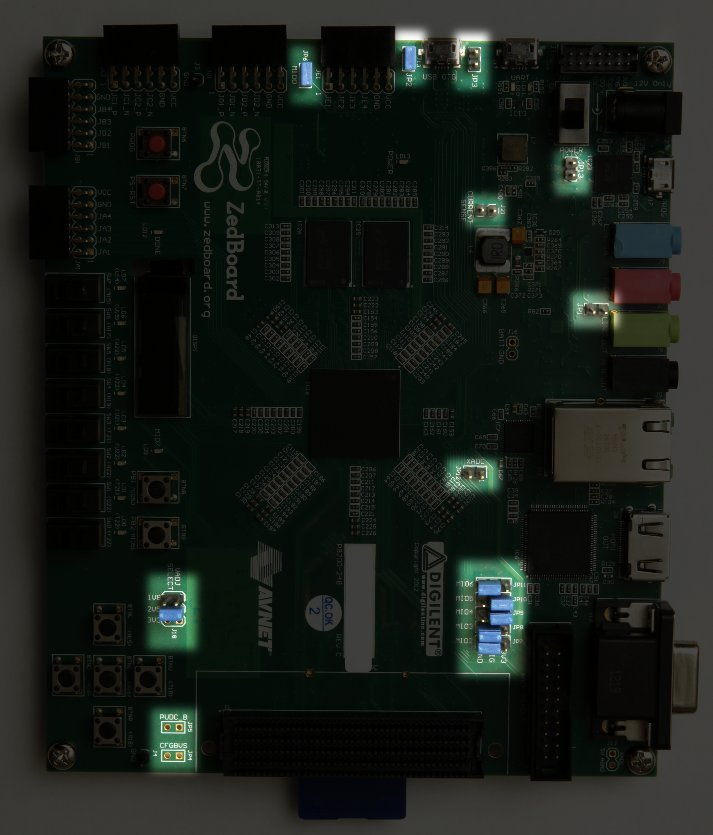
Zedboard 上跳线设置高亮显示
4.1.2 MicroZed
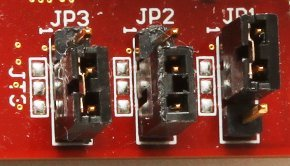
从 MicroSD 卡启动 Xillinux 的正确跳线设置如下:
-
JP1: 1-2 (GND)
-
JP2: 2-3 (VCC)
-
JP3: 2-3 (VCC)
对于默认设置的开发板,只需移动 JP2 即可。
正确跳线设置如下图所示:
4.1.3 Zybo
启动模式由 VGA 连接器附近的一个跳线选择,应将其设置在标有 “SD” 的两个引脚上,如下图所示:
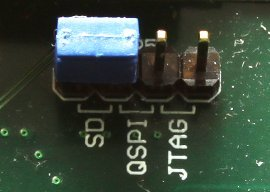
其他跳线根据所需工作模式设置。例如,电源跳线可设置为从外部 5V 电源取电,或从 UART USB 接口取电——这两种方式 都能使 Xillinux 正常启动。
4.1.4 Z-Turn Lite
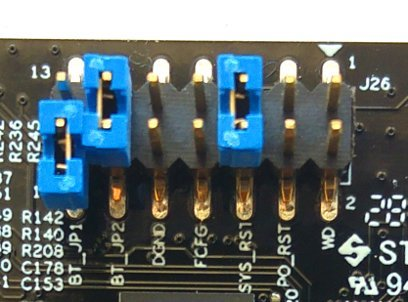
以太网连接器旁边的跳线(标为 J26)决定启动模式,应按如下方式设置:
-
BT_JP1 跳线不应放置(或如图所示仅套在一个引脚上)
-
BT_JP2 跳线应放置
-
FCFG 和 PO_RST 不应放置
与启动操作无关,但以下两个跳线也较重要:
-
SYS_RST 跳线允许通过按下板上的 K2 按钮来复位 Zynq 处理器。
-
WD(看门狗)跳线允许处理器使能板载看门狗芯片。Xillinux 无论是否放置该跳线都能正常启动。
DGND 引脚对只是两个接地引脚,在上面放置跳线没有任何作用。
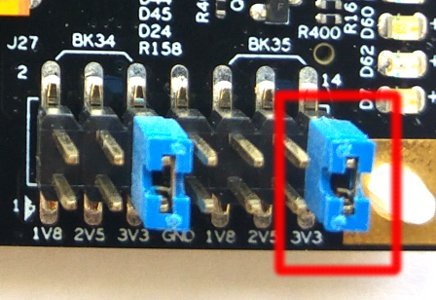
另外,如果使用 HDMI 视频输出(通过 Cape IO 板),Zynq 器件的 bank 35 必须由 3.3V 电压供电。这通过 J27 上 BK35 组的 3V3 跳线实现,该跳线位于靠近 MicroSD 卡的板角处(见下图)。
4.2 连接外设
以下通用硬件可连接到开发板:
-
Z-Turn Lite 配合 Z-Turn Lite IO Cape 扩展板: 将电脑显示器连接到 Cape 板的 HDMI 接口。或者,通过 HDMI/DVI 适配器 或线缆将 DVI 输入连接到板上的 HDMI 插头。
-
Zedboard / Zybo: 将电脑显示器连接到模拟 VGA 接口。
-
Zybo:也可使用带 HDMI 输入的电脑显示器。或者通过 HDMI/DVI 适配器或线缆将 DVI 输入连接到板上的 HDMI 插头。
-
Zedboard/Zybo/Z-Turn Lite:将鼠标和键盘连接到 USB(OTG)接口。
在 Zybo 上,有一个类似 PC 的 USB 插口用于此目的。 在 Zedboard 和 Z-Turn Lite 上,需要通过随 Zedboard 附带的 USB 母头线缆(较短的那根)连接。该线缆在以“套件”配置购买 Z-Turn Lite 时也会附带。
即使没有这些外设,系统也能正常启动;在系统运行过程中连接和断开键盘鼠标也毫无问题——系统会随时检测并使用当前 连接的键盘和鼠标。
注意,在 Zedboard 上,必须安装 JP2 才能使 USB 端口正常工作。
-
以太网端口用于常规网络任务可选。如果所连网络有 DHCP 服务器,Linux 系统会自动配置网络。
-
UART USB 端口可连接到 PC,但在 Zedboard 和 Zybo 上大多数情况下不需要。一些启动信息会发送到该端口,启动完成后该接口上会 给出 shell 提示符。
这对于调试启动失败,或当 PC 显示器或键盘缺失或工作不正常时非常有用。
对于 Z-Turn Lite,需要外部 USB 适配器来连接板上的 3.3V UART 信号。该适配器可能随板附带,具体说明见 Xillybus 关于 Z-Turn Lite 的 网页。
4.3 给开发板上电
4.3.1 初步诊断
如果严格按照上述构建说明操作,启动失败的情况很少见。常见原因包括:
-
跳线设置不正确(见第 4.1 节)。
-
使用了非 Sandisk 生产的(Micro)SD 卡。即使卡看似工作正常,零星的数据损坏也很容易被忽略,但会导致看似完全无关 的错误。
-
(Micro)SD 镜像写入不完整或有误。
-
U-boot 从板载 QSPI 闪存加载的旧环境变量不适用。见第 4.3.3 节。
-
未遵循说明,通常是由于首次构建时试图调整系统。
正确的 UART 设置为 115200 波特率、8 个数据位、1 个停止位,无流控。开发板上电后 4 秒内应出现一些文本。要实现这 一点,唯一的要求是在(Micro)SD 卡的第一个(FAT32)分区中找到 boot.bin 文件。
如果上电后没有任何反应:
-
确认已从与开发板类型匹配的启动分区套件中复制了正确的 boot.bin。套件文件名指示了适用于哪块开发板。
-
确认 UART 到电脑的链路工作正常,可用 QSPI 闪存或(可能)随板附带的 SD 卡上的示例 Linux 进行测试。注意,Linux 作为 UART 终端应用程序的主机,可能与某些 UART/USB 转换器不兼容,因此尝试在 Windows 下使用 Tera Term 可能是唯一选择。
如果 U-boot 在控制台上输出了消息,但启动过程失败,可参考第 4.3.5 节中的启动日志进行对比。 本节其余内容也可能包含有助于理解问题的相关信息。
4.3.2 启动过程完成时
启动过程结束时,UART 控制台上会给出 shell 提示符,无需手动登录。即便如此,root 用户的密码为空,因此如果需要以 root 登录,也无需密码。
重要
的:
与随板附带的(Micro)SD 卡上的 Linux 示例不同,Xillinux 的根文件系统永久驻留在(Micro)SD 卡上,并且在系统运行
时会写入数据。与任何 PC 计算机一样,在断电之前应正确关闭 Linux 系统以保持系统稳定,尽管突然断电后通常也能正常恢
复。
Z-Turn Lite、Zedboard 和 Zybo 的注意事项:
-
在 shell 提示符下输入 “startx” 可启动 LXDE 图形桌面。桌面需要约 15-30 秒初始化。如果似乎没有任何反应,观察 OLED 显示屏上的活动指示器有助于判断是否正在运行(只有 Zedboard 有此 OLED 显示屏)。
-
从逻辑结构加载完成到 Linux 内核启动期间,屏幕上会显示白底 Xillybus 标志屏幕保护程序。当操作系统将屏幕置于“空 白”模式时也会显示,这是系统空闲时的正常状态,或者当 X-Windows 系统尝试操作图形模式时也会出现。
-
蓝色背景的 Xillybus 屏幕保护程序或屏幕上出现随机蓝色条纹,表示图形接口遭遇数据饥饿。这不应 出现,如果发生,请报告,除非已知明显原因。
4.3.3 U-boot 环境变量
Xillinux 在启动过程中依赖 U-boot 加载 xillydemo.bit、内核镜像和设备树。该工具提供了丰富的启动配置,并具有简单的命令行界面,允 许实验和修改设置。
在 U-boot 启动后立即在 UART 控制台上按任意键即可进入 U-boot 的 shell:
U-Boot 2013.07 (Mar 15 2014 - 22:59:21)

Memory: ECC disabled
DRAM: 512 MiB
MMC: zynq_sdhci: 0
SF: Detected S25FL129P_64K/S25FL128S_64K with page size 64 KiB, total 16 MiB
*** Warning - bad CRC, using default environment

In: serial
Out: serial
Err: serial
Net: Gem.e000b000
Hit any key to stop autoboot: 1
U-boot 总是尝试从 QSPI 闪存中读取保存的环境变量。警告 “bad CRC” 表示未找到有效数据,因此 U-boot 恢复到其硬编码的默认环境。 对于从(Micro)SD 卡启动 Xillinux 而言,这不是错误,因为 Xillinux 的 U-boot 所有环境变量都已正确设置。
重要
的:
请注意,即使系统从(Micro)SD 卡启动,环境变量仍取自板载 QSPI 闪存。如果 QSPI 闪存中保存的环境变量与另一种
启动场景匹配,U-boot 可能因依赖不适当的变量而导致启动失败。
如果一秒钟内没有按下任何键,U-boot 会根据其环境变量(从 QSPI 闪存加载或硬编码默认设置)继续执行。更准确地说, 它会执行 “bootcmd” 变量的内容,该变量默认值为 “run $modeboot”。而 “modeboot” 由 U-boot 根据加载来源动态设置,因 此在常规 Xillinux 启动中为 “sdboot”。“sdboot” 变量包含一系列用于执行 Xillinux 启动过程的命令。
U-boot 的命令行 shell 有 “help” 命令,可列出所有命令及其含义。一些有用的命令包括:
-
help command —— 显示 command 的帮助信息。
-
env print —— 打印所有环境变量的当前值。
-
env set —— 设置某个环境变量的值。
-
env default -a —— 将所有环境变量重置为硬编码默认值。
-
saveenv —— 将当前环境变量保存到 QSPI 闪存(注意:不是保存到 MicroSD/SD 卡)。
尤其要注意列表中的最后两个命令,它们在 U-boot 启动失败时很重要。如果 U-boot 没有发出 “bad CRC, using default environment” 的警告,则说明它依赖的是存储的变量。为了使用默认变量(对 Xillinux 是正确的),请执行:
xillinux-uboot> env default -a
## Resetting to default environment
xillinux-uboot> saveenv
Saving Environment to SPI Flash...
SF: Detected S25FL129P_64K/S25FL128S_64K with page size 64 KiB, total 16 MiB
Erasing SPI flash...Writing to SPI flash...done
当然,如果存储的环境变量中有任何需要的修改,它们也会被一并擦除。
4.3.4 设置自定义以太网 MAC 地 址
默认情况下,Linux 依赖 U-boot 设置的以太网 MAC 地址。
要更改 MAC 地址,可以添加一个网络管理器读取的配置文件。例如,将以下内容复制到名为 /etc/NetworkManager/system-connections/eth0 的文件中:
[connection]
id=eth0
type=ethernet

[ethernet]
cloned-mac-address=00:11:22:33:44:55
mac-address=00:0A:35:00:01:22
需要更改此文件的权限,以便网络管理器信任该配置:
# cd /etc/NetworkManager/system-connections/
# chmod 0600 eth0
除 “eth0” 外,此目录中不应有其他文件。如果有其他文件,请删除。
重新启动 Linux 后,MAC 地址将变为 00:11:22:33:44:55。
也可以借助命令行工具 “nmcli” 完成相同任务。不过在图形桌面上操作更为简单:点击桌面右下角的网络管理器图标,该图标 看起来像一个连接到墙壁的以太网插头。选择 “Edit Connections...”,然后选择 “Wired connection 1”,点击 “Edit”。在 “Cloned MAC address” 旁边输入新的 MAC 地址,然后点击 “Save”。新 MAC 地址将在 Linux 重启后生效。
另一种替代方法是更改 U-boot 的某个环境变量。注意,此方法在某些版本的 Xillinux 上不起作用,因为 U-boot 不一定能访 问 QSPI 闪存,因此 “saveenv” 命令并非总是受支持。
由于环境变量存储在 QSPI 闪存中,MAC 地址会持久绑定到硬件。这与前一种方法不同,前一种方法中 MAC 地址绑定到 (Micro)SD 卡。
例如,在 U-boot shell 中通过 USB UART 控制台执行:
xillinux-uboot> set ethaddr 00:11:22:33:44:55
xillinux-uboot> saveenv
Saving Environment to SPI Flash...
Erasing SPI flash...Writing to SPI flash...done
之后,重新给开发板上电,让 Linux 自动启动:
root@localhost:~# ifconfig
eth1   Link encap:Ethernet HWaddr 00:11:22:33:44:55
     inet addr:10.1.1.164 Bcast:10.1.1.255 Mask:255.255.255.0
     inet6 addr: fe80::211:22ff:fe33:4455/64 Scope:Link
     UP BROADCAST RUNNING MULTICAST MTU:1500 Metric:1
     RX packets:16 errors:0 dropped:0 overruns:0 frame:0
     TX packets:50 errors:0 dropped:0 overruns:0 carrier:0
     collisions:0 txqueuelen:1000
     RX bytes:2720 (2.7 KB) TX bytes:9230 (9.2 KB)
     Interrupt:54 Base address:0xb000
(上例中的 IP 地址由 DHCP 服务器分配)
4.3.5 启动过程中的示例日志
供参考,以下给出一个典型的启动过程中 UART 日志。示例为 Zedboard,但各开发板之间的差异很小。如果启动失败,错 误消息很可能会指示哪个阶段出了问题,并可能说明原因。
U-Boot 2013.07 (Aug 10 2014 - 11:28:31)

Zynq PS_VERSION = 0
Memory: ECC disabled
DRAM: 512 MiB
MMC:    zynq_sdhci: 0
SF: Detected S25FL256S_64K with page size 64 KiB, total 32 MiB
In:     serial
Out:    serial
Err:    serial
Net:    Gem.e000b000
Hit any key to stop autoboot: 1 0
Device: zynq_sdhci
Manufacturer ID: 3
OEM: 5344
Name: SL08G
Tran Speed: 50000000
Rd Block Len: 512
SD version 3.0
High Capacity: Yes
Capacity: 7.4 GiB
Bus Width: 4-bit
Booting Xillinux...
reading xillydemo.bit
4045675 bytes read in 295 ms (13.1 MiB/s)
  design filename = "xillydemo.ncd;HW_TIMEOUT=FALSE;UserID=0xFFFFFFFF"
  part number = "7z020clg484"
  date = "2014/03/11"
  time = "22:22:00"
  bytes in bitstream = 4045564
zynq_load: Align buffer at 10006f to 100080(swap 1)
reading uImage
4487928 bytes read in 326 ms (13.1 MiB/s)
reading devicetree.dtb
9531 bytes read in 16 ms (581.1 KiB/s)
## Booting kernel from Legacy Image at 03000000 ...
    Image Name:   Linux-4.4.30-xillinux-2.0
    Image Type:   ARM Linux Kernel Image (uncompressed)
    Data Size:    4487864 Bytes = 4.3 MiB
    Load Address: 00008000
    Entry Point: 00008000
    Verifying Checksum ... OK
## Flattened Device Tree blob at 02a00000
    Booting using the fdt blob at 0x2a00000
    Loading Kernel Image ... OK
    Loading Device Tree to 1fb4e000, end 1fb5353a ... OK

Starting kernel ...

Uncompressing Linux... done, booting the kernel.
[    0.000000] Booting Linux on physical CPU 0x0
[    0.000000] Initializing cgroup subsys cpuset
[    0.000000] Initializing cgroup subsys cpu
[    0.000000] Initializing cgroup subsys cpuacct
[    0.000000] Linux version 4.4.30-xillinux-2.0 (eli@ocho.localdomain) (gcc version 4.7.3 (Sourcery CodeBench Lite 2013.05-40) ) #1 SMP PREEMPT Tue Dec 5 11:54:25 IST 2017 ()
[    0.000000] CPU: ARMv7 Processor [413fc090] revision 0 (ARMv7), cr=18c5387d
[    0.000000] CPU: PIPT / VIPT nonaliasing data cache, VIPT aliasing instruction cache
[    0.000000] Machine model: Xilinx Zynq
[    0.000000] bootconsole [earlycon0] enabled
[    0.000000] cma: Reserved 16 MiB at 0x1e800000
[    0.000000] Memory policy: Data cache writealloc
[    0.000000] PERCPU: Embedded 12 pages/cpu @dfb36000 s18880 r8192 d22080 u49152
[    0.000000] Built 1 zonelists in Zone order, mobility grouping on. Total pages: 129920
[    0.000000] Kernel command line: console=ttyPS0,115200n8 console=tty0 consoleblank=0 root=/dev/mmcblk0p2 rw rootwait earlyprintk
[    0.000000] PID hash table entries: 2048 (order: 1, 8192 bytes)
[    0.000000] Dentry cache hash table entries: 65536 (order: 6, 262144 bytes)
[    0.000000] Inode-cache hash table entries: 32768 (order: 5, 131072 bytes)
[    0.000000] Memory: 493232K/524288K available (6155K kernel code, 294K rwdata, 2192K rodata, 312K init, 472K bss, 14672K reserved, 16384K cma-reserved, 0K highmem)
[    0.000000] Virtual kernel memory layout:
[    0.000000]     vector : 0xffff0000 - 0xffff1000     (   4 kB)
[    0.000000]     fixmap : 0xffc00000 - 0xfff00000     (3072 kB)
[    0.000000]     vmalloc : 0xe0800000 - 0xff800000    ( 496 MB)
[    0.000000]     lowmem : 0xc0000000 - 0xe0000000     ( 512 MB)
[    0.000000]     pkmap   : 0xbfe00000 - 0xc0000000    (   2 MB)
[    0.000000]     modules : 0xbf000000 - 0xbfe00000    ( 14 MB)
[    0.000000]       .text : 0xc0008000 - 0xc082f0c4    (8349 kB)
[    0.000000]       .init : 0xc0830000 - 0xc087e000    ( 312 kB)
[    0.000000]       .data : 0xc087e000 - 0xc08c7840    ( 295 kB)
[    0.000000]        .bss : 0xc08c7840 - 0xc093da38    ( 473 kB)
[    0.000000] Preemptible hierarchical RCU implementation.
[    0.000000]         Build-time adjustment of leaf fanout to 32.
[    0.000000]         RCU restricting CPUs from NR_CPUS=4 to nr_cpu_ids=2.
[    0.000000] RCU: Adjusting geometry for rcu_fanout_leaf=32, nr_cpu_ids=2
[    0.000000] NR_IRQS:16 nr_irqs:16 16
[    0.000000] slcr mapped to e0800000
[    0.000000] L2C: platform modifies aux control register: 0x72360000 -> 0x72760000
[    0.000000] L2C: DT/platform modifies aux control register: 0x72360000 -> 0x72760000
[    0.000000] L2C-310 erratum 769419 enabled
[    0.000000] L2C-310 enabling early BRESP for Cortex-A9
[    0.000000] L2C-310 full line of zeros enabled for Cortex-A9
[    0.000000] L2C-310 ID prefetch enabled, offset 1 lines
[    0.000000] L2C-310 dynamic clock gating enabled, standby mode enabled
[    0.000000] L2C-310 cache controller enabled, 8 ways, 512 kB
[    0.000000] L2C-310: CACHE_ID 0x410000c8, AUX_CTRL 0x76760001
[    0.000000] zynq_clock_init: clkc starts at e0800100
[    0.000000] Zynq clock init
[    0.000000] clocksource: ttc_clocksource: mask: 0xffff max_cycles: 0xffff, max_idle_ns: 537538477 ns
[    0.000018] sched_clock: 16 bits at 54kHz, resolution 18432ns, wraps every 603975816ns
[    0.007925] ps7-ttc #0 at e0808000, irq=17
[    0.012173] sched_clock: 64 bits at 333MHz, resolution 3ns, wraps every 4398046511103ns
[    0.020052] clocksource: arm_global_timer: mask: 0xffffffffffffffff max_cycles: 0x4ce07af025, max_idle_ns: 440795209040 ns
[    0.031309] Console: colour dummy device 80x30
[    0.035629] console [tty0] enabled
[    0.039067] bootconsole [earlycon0] disabled
[    0.000000] Booting Linux on physical CPU 0x0
[    0.000000] Initializing cgroup subsys cpuset
[    0.000000] Initializing cgroup subsys cpu
[    0.000000] Initializing cgroup subsys cpuacct
[    0.000000] Linux version 4.4.30-xillinux-2.0 (eli@ocho.localdomain) (gcc version 4.7.3 (Sourcery CodeBench Lite 2013.05-40) ) #1 SMP PREEMPT Tue Dec 5 11:54:25 IST 2017 ()
[    0.000000] CPU: ARMv7 Processor [413fc090] revision 0 (ARMv7), cr=18c5387d
[    0.000000] CPU: PIPT / VIPT nonaliasing data cache, VIPT aliasing instruction cache
[    0.000000] Machine model: Xilinx Zynq
[    0.000000] bootconsole [earlycon0] enabled
[    0.000000] cma: Reserved 16 MiB at 0x1e800000
[    0.000000] Memory policy: Data cache writealloc
[    0.000000] PERCPU: Embedded 12 pages/cpu @dfb36000 s18880 r8192 d22080 u49152
[    0.000000] Built 1 zonelists in Zone order, mobility grouping on. Total pages: 129920
[    0.000000] Kernel command line: console=ttyPS0,115200n8 console=tty0 consoleblank=0 root=/dev/mmcblk0p2 rw rootwait earlyprintk
[    0.000000] PID hash table entries: 2048 (order: 1, 8192 bytes)
[    0.000000] Dentry cache hash table entries: 65536 (order: 6, 262144 bytes)
[    0.000000] Inode-cache hash table entries: 32768 (order: 5, 131072 bytes)
[    0.000000] Memory: 493232K/524288K available (6155K kernel code, 294K rwdata, 2192K rodata, 312K init, 472K bss, 14672K reserved, 16384K cma-reserved, 0K highmem)
[    0.000000] Virtual kernel memory layout:
[    0.000000]     vector : 0xffff0000 - 0xffff1000     (   4 kB)
[    0.000000]     fixmap : 0xffc00000 - 0xfff00000     (3072 kB)
[    0.000000]     vmalloc : 0xe0800000 - 0xff800000    ( 496 MB)
[    0.000000]     lowmem : 0xc0000000 - 0xe0000000     ( 512 MB)
[    0.000000]     pkmap   : 0xbfe00000 - 0xc0000000    (   2 MB)
[    0.000000]     modules : 0xbf000000 - 0xbfe00000    ( 14 MB)
[    0.000000]       .text : 0xc0008000 - 0xc082f0c4    (8349 kB)
[    0.000000]       .init : 0xc0830000 - 0xc087e000    ( 312 kB)
[    0.000000]       .data : 0xc087e000 - 0xc08c7840    ( 295 kB)
[    0.000000]        .bss : 0xc08c7840 - 0xc093da38    ( 473 kB)
[    0.000000] Preemptible hierarchical RCU implementation.
[    0.000000]         Build-time adjustment of leaf fanout to 32.
[    0.000000]         RCU restricting CPUs from NR_CPUS=4 to nr_cpu_ids=2.
[    0.000000] RCU: Adjusting geometry for rcu_fanout_leaf=32, nr_cpu_ids=2
[    0.000000] NR_IRQS:16 nr_irqs:16 16
[    0.000000] slcr mapped to e0800000
[    0.000000] L2C: platform modifies aux control register: 0x72360000 -> 0x72760000
[    0.000000] L2C: DT/platform modifies aux control register: 0x72360000 -> 0x72760000
[    0.000000] L2C-310 erratum 769419 enabled
[    0.000000] L2C-310 enabling early BRESP for Cortex-A9
[    0.000000] L2C-310 full line of zeros enabled for Cortex-A9
[    0.000000] L2C-310 ID prefetch enabled, offset 1 lines
[    0.000000] L2C-310 dynamic clock gating enabled, standby mode enabled
[    0.000000] L2C-310 cache controller enabled, 8 ways, 512 kB
[    0.000000] L2C-310: CACHE_ID 0x410000c8, AUX_CTRL 0x76760001
[    0.000000] zynq_clock_init: clkc starts at e0800100
[    0.000000] Zynq clock init
[    0.000000] clocksource: ttc_clocksource: mask: 0xffff max_cycles: 0xffff, max_idle_ns: 537538477 ns
[    0.000018] sched_clock: 16 bits at 54kHz, resolution 18432ns, wraps every 603975816ns
[    0.007925] ps7-ttc #0 at e0808000, irq=17
[    0.012173] sched_clock: 64 bits at 333MHz, resolution 3ns, wraps every 4398046511103ns
[    0.020052] clocksource: arm_global_timer: mask: 0xffffffffffffffff max_cycles: 0x4ce07af025, max_idle_ns: 440795209040 ns
[    0.031309] Console: colour dummy device 80x30
[    0.035629] console [tty0] enabled
[    0.039067] bootconsole [earlycon0] disabled
[    0.043389] Calibrating delay loop... 1332.01 BogoMIPS (lpj=6660096)
[    0.130990] pid_max: default: 32768 minimum: 301
[    0.131116] Security Framework initialized
[    0.131135] Yama: becoming mindful.
[    0.131211] AppArmor: AppArmor initialized
[    0.131270] Mount-cache hash table entries: 1024 (order: 0, 4096 bytes)
[    0.131295] Mountpoint-cache hash table entries: 1024 (order: 0, 4096 bytes)
[    0.132028] Initializing cgroup subsys io
[    0.132059] Initializing cgroup subsys memory
[    0.132104] Initializing cgroup subsys devices
[    0.132133] Initializing cgroup subsys freezer
[    0.132156] Initializing cgroup subsys net_cls
[    0.132177] Initializing cgroup subsys perf_event
[    0.132200] Initializing cgroup subsys net_prio
[    0.132222] Initializing cgroup subsys pids
[    0.132274] CPU: Testing write buffer coherency: ok
[    0.132537] CPU0: thread -1, cpu 0, socket 0, mpidr 80000000
[    0.132602] Setting up static identity map for 0x82c0 - 0x82f4
[    0.310974] CPU1: thread -1, cpu 1, socket 0, mpidr 80000001
[    0.311078] Brought up 2 CPUs
[    0.311115] SMP: Total of 2 processors activated (2664.03 BogoMIPS).
[    0.311133] CPU: All CPU(s) started in SVC mode.
[    0.312116] devtmpfs: initialized
[    0.314713] evm: security.selinux
[    0.314734] evm: security.SMACK64
[    0.314748] evm: security.SMACK64EXEC
[    0.314761] evm: security.SMACK64TRANSMUTE
[    0.314775] evm: security.SMACK64MMAP
[    0.314804] evm: security.ima
[    0.314824] evm: security.capability
[    0.315239] VFP support v0.3: implementor 41 architecture 3 part 30 variant 9 rev 4
[    0.315600] clocksource: jiffies: mask: 0xffffffff max_cycles: 0xffffffff, max_idle_ns: 19112604462750000 ns
[    0.316774] pinctrl core: initialized pinctrl subsystem
[    0.318050] NET: Registered protocol family 16
[    0.320031] DMA: preallocated 256 KiB pool for atomic coherent allocations
[    0.323590] zynq_gpio e000a000.ps7-gpio: This is the Xillinux-1.3 compliant legacy GPIO driver.
[    0.324184] zynq_gpio e000a000.ps7-gpio: gpio at 0xe000a000 mapped to 0xe0814000
[    0.329041] hw-breakpoint: found 5 (+1 reserved) breakpoint and 1 watchpoint registers.
[    0.329099] hw-breakpoint: maximum watchpoint size is 4 bytes.
[    0.375012] vgaarb: loaded
[    0.377592] SCSI subsystem initialized
[    0.378094] usbcore: registered new interface driver usbfs
[    0.378220] usbcore: registered new interface driver hub
[    0.378369] usbcore: registered new device driver usb
[    0.378741] media: Linux media interface: v0.10
[    0.378849] Linux video capture interface: v2.00
[    0.379225] pps_core: LinuxPPS API ver. 1 registered
[    0.379263] pps_core: Software ver. 5.3.6 - Copyright 2005-2007 Rodolfo Giometti <giometti@linux.it>
[    0.379346] PTP clock support registered
[    0.379675] EDAC MC: Ver: 3.0.0
[    0.383475] NetLabel: Initializing
[    0.383515] NetLabel: domain hash size = 128
[    0.383538] NetLabel: protocols = UNLABELED CIPSOv4
[    0.383614] NetLabel: unlabeled traffic allowed by default
[    0.384003] clocksource: Switched to clocksource arm_global_timer
[    0.384740] AppArmor: AppArmor Filesystem Enabled
[    0.399611] NET: Registered protocol family 2
[    0.400379] TCP established hash table entries: 4096 (order: 2, 16384 bytes)
[    0.400470] TCP bind hash table entries: 4096 (order: 3, 32768 bytes)
[    0.400579] TCP: Hash tables configured (established 4096 bind 4096)
[    0.400652] UDP hash table entries: 256 (order: 1, 8192 bytes)
[    0.400701] UDP-Lite hash table entries: 256 (order: 1, 8192 bytes)
[    0.400961] NET: Registered protocol family 1
[    0.402023] RPC: Registered named UNIX socket transport module.
[    0.402065] RPC: Registered udp transport module.
[    0.402090] RPC: Registered tcp transport module.
[    0.402114] RPC: Registered tcp NFSv4.1 backchannel transport module.
[    0.402789] hw perfevents: enabled with armv7_cortex_a9 PMU driver, 7 counters available
[    0.404341] futex hash table entries: 512 (order: 3, 32768 bytes)
[    0.404505] audit: initializing netlink subsys (disabled)
[    0.404585] audit: type=2000 audit(0.379:1): initialized
[    0.405111] Initialise system trusted keyring
[    0.405881] VFS: Disk quotas dquot_6.6.0
[    0.405984] VFS: Dquot-cache hash table entries: 1024 (order 0, 4096 bytes)
[    0.406373] squashfs: version 4.0 (2009/01/31) Phillip Lougher
[    0.407215] NFS: Registering the id_resolver key type
[    0.407288] Key type id_resolver registered
[    0.407315] Key type id_legacy registered
[    0.407361] nfs4filelayout_init: NFSv4 File Layout Driver Registering...
[    0.407468] jffs2: version 2.2. (NAND) (SUMMARY) © 2001-2006 Red Hat, Inc.
[    0.407949] Allocating IMA MOK and blacklist keyrings.
[    0.409634] Key type asymmetric registered
[    0.409681] Asymmetric key parser 'x509' registered
[    0.409832] Block layer SCSI generic (bsg) driver version 0.4 loaded (major 248)
[    0.410040] io scheduler noop registered
[    0.410079] io scheduler deadline registered (default)
[    0.410137] io scheduler cfq registered
[    0.440104] Console: switching to colour frame buffer device 128x48
[    0.468985] xuartps e0001000.serial: clock name 'aper_clk' is deprecated.
[    0.469289] xuartps e0001000.serial: clock name 'ref_clk' is deprecated.
[    0.469614] e0001000.serial: ttyPS0 at MMIO 0xe0001000 (irq = 158, base_baud = 3125000) is a xuartps
[    1.278046] console [ttyPS0] enabled
[    1.282451] xdevcfg f8007000.ps7-dev-cfg: ioremap 0xf8007000 to e0872000
[    1.305388] brd: module loaded
[    1.315816] loop: module loaded
[    1.337113] libphy: Fixed MDIO Bus: probed
[    1.343139] libphy: XEMACPS mii bus: probed
[    1.348856] xemacps e000b000.ps7-ethernet: pdev->id -1, baseaddr 0xe000b000, irq 31
[    1.357688] ehci_hcd: USB 2.0 'Enhanced' Host Controller (EHCI) Driver
[    1.364433] ehci-pci: EHCI PCI platform driver
[    1.369044] ehci-platform: EHCI generic platform driver
[    1.381383] ohci_hcd: USB 1.1 'Open' Host Controller (OHCI) Driver
[    1.394522] ohci-pci: OHCI PCI platform driver
[    1.405966] ohci-platform: OHCI generic platform driver
[    1.418231] uhci_hcd: USB Universal Host Controller Interface driver
[    1.431756] usbcore: registered new interface driver usb-storage
[    1.445354] mousedev: PS/2 mouse device common for all mice
[    1.458696] i2c /dev entries driver
[    1.470432] device-mapper: uevent: version 1.0.3
[    1.482312] device-mapper: ioctl: 4.34.0-ioctl (2015-10-28) initialised: dm-devel@redhat.com
[    1.497966] sdhci: Secure Digital Host Controller Interface driver
[    1.511276] sdhci: Copyright(c) Pierre Ossman
[    1.522726] sdhci-pltfm: SDHCI platform and OF driver helper
[    1.537085] sdhci-arasan e0100000.ps7-sdio: No vmmc regulator found
[    1.550571] sdhci-arasan e0100000.ps7-sdio: No vqmmc regulator found
[    1.564036] mmc0: Invalid maximum block size, assuming 512 bytes
[    1.614085] mmc0: SDHCI controller on e0100000.ps7-sdio [e0100000.ps7-sdio] using ADMA
[    1.629895] ledtrig-cpu: registered to indicate activity on CPUs
[    1.644279] Key type dns_resolver registered
[    1.656171] Registering SWP/SWPB emulation handler
[    1.666380] mmc0: new high speed SDHC card at address aaaa
[    1.677100] mmcblk0: mmc0:aaaa SL08G 7.40 GiB
[    1.678486] mmcblk0: p1 p2
[    1.703249] registered taskstats version 1
[    1.714453] Loading compiled-in X.509 certificates
[    1.727453] Key type encrypted registered
[    1.738464] AppArmor: AppArmor sha1 policy hashing enabled
[    1.750995] ima: No TPM chip found, activating TPM-bypass!
[    1.763635] evm: HMAC attrs: 0x1
[    1.774166] hctosys: unable to open rtc device (rtc0)
[    1.791487] md: Waiting for all devices to be available before autodetect
[    1.805427] md: If you don't use raid, use raid=noautodetect
[    1.819245] md: Autodetecting RAID arrays.
[    1.830359] md: Scanned 0 and added 0 devices.
[    1.841633] md: autorun ...
[    1.851105] md: ... autorun DONE.
[    1.861835] EXT4-fs (mmcblk0p2): couldn't mount as ext3 due to feature incompatibilities
[    1.877515] EXT4-fs (mmcblk0p2): couldn't mount as ext2 due to feature incompatibilities
[    1.906578] EXT4-fs (mmcblk0p2): mounted filesystem with ordered data mode. Opts: (null)
[    1.921636] VFS: Mounted root (ext4 filesystem) on device 179:2.
[    1.942290] devtmpfs: mounted
[    1.952285] Freeing unused kernel memory: 312K (c0830000 - c087e000)
[    2.204187] systemd[1]: System time before build time, advancing clock.
[    2.323264] NET: Registered protocol family 10
[    2.372338] random: systemd: uninitialized urandom read (16 bytes read, 6 bits of entropy available)
[    2.390906] random: systemd: uninitialized urandom read (16 bytes read, 6 bits of entropy available)
[    2.414805] systemd[1]: systemd 229 running in system mode. (+PAM +AUDIT +SELINUX +IMA +APPARMOR +SMACK +SYSVINIT +UTMP +LIBCRYPTSETUP +GCRYPT +GNUTLS +ACL +XZ -LZ4 +SECCOMP +BLKID +ELFUTILS +KMOD -IDN)
[    2.447961] systemd[1]: Detected architecture arm.
[    2.491022] systemd[1]: Set hostname to <localhost.localdomain>.
之后继续 systemd 初始化。不超过 30 秒后,会出现如下 shell 提示符。在此之前可能会有几秒钟的停顿:
Ubuntu 16.04 LTS localhost.localdomain ttyPS0

localhost login: root (automatic login)

Last login: Thu Feb 11 16:28:21 UTC 2016 on ttyPS0
Welcome to the Xillinux-2.0 distribution for Xilinx Zynq.

You may communicate data with standard FPGA FIFOs in the logic fabric by
writing to or reading from the /dev/xillybus_* device files. Additional
pipe files of that sort can be set up with a custom Xillybus IP core.

For more information: http://www.xillybus.com.

To start a graphical X-Windows session, type "startx" at shell prompt.

root@localhost:~#
4.4 首次启动后建议尽快执行的操 作
4.4.1 调整文件系统大小
根文件系统的镜像保持较小,以便尽快写入设备。另一方面,没有理由不使用(Micro)SD 卡的全部容量。
重要
的:
尝试调整文件系统大小时存在擦除整张(Micro)SD 卡内容的重要风险。因此建议尽早执行此操作,因为一旦发生此类事
故,代价仅仅是重新初始化(Micro)SD 卡(写入镜像并填充启动分区)。
初始状态通常如下所示:
# df -h
Filesystem   Size Used Avail Use% Mounted on
/dev/root   3.4G 2.8G 388M 89% /
devtmpfs     241M 0 241M 0% /dev
tmpfs      249M 72K 249M 1% /dev/shm
tmpfs      249M 7.2M 242M 3% /run
tmpfs      5.0M 0 5.0M 0% /run/lock
tmpfs      249M 0 249M 0% /sys/fs/cgroup
tmpfs       50M 4.0K 50M 1% /run/user/0
因此根文件系统为 2.8 GB,空闲 388 MB。
第一步是重新分区(Micro)SD 卡。在 shell 提示符下输入:
# fdisk /dev/mmcblk0
然后按如下方式操作(另见下面的会话记录):
-
d [ENTER] —— 删除分区
-
2 [ENTER] —— 选择分区号 2
-
n [ENTER] —— 创建新分区
-
按 [ENTER] 四次以接受默认值:主分区、编号 2、从最低可能扇区开始,到最高可能扇区结束。
-
w [ENTER] —— 保存并退出。
如果在操作过程中出现问题,只需按 CTRL-C(或 q [ENTER])退出 fdisk 而不保存更改。在最后一步之前,(Micro)SD 卡上的内容不会发生任何变化。
典型的会话如下所示。请注意,扇区号可能有所不同。
# fdisk /dev/mmcblk0

Welcome to fdisk (util-linux 2.27.1).
Changes will remain in memory only, until you decide to write them.
Be careful before using the write command.


Command (m for help): d
Partition number (1,2, default 2): 2

Partition 2 has been deleted.

Command (m for help): n
Partition type
 p primary (1 primary, 0 extended, 3 free)
 e extended (container for logical partitions)
Select (default p):

Using default response p.
Partition number (2-4, default 2):
First sector (32768-15523839, default 32768):
Last sector, +sectors or +size{K,M,G,T,P} (32768-15523839, default 15523839):

Created a new partition 2 of type 'Linux' and of size 7.4 GiB.

Command (m for help): w
The partition table has been altered.
Calling ioctl() to re-read partition table.
Re-reading the partition table failed.: Device or resource busy

The kernel still uses the old table. The new table will be used at
the next reboot or after you run partprobe(8) or kpartx(8).
如果您的系统上显示的默认起始扇区与上述不同,请使用您系统上的默认值,而不是此处显示的值。
此过程中唯一可能需要偏离 fdisk 默认值的地方是结束扇区,以便创建一个比最大可能更小的文件系统(但通常没有必要这 样做)。
正如底部的警告所述,Linux 对分区表的视图尚未更新。按照建议,输入:
# partprobe
该命令应不向控制台输出任何内容。如果它抱怨无法通知内核分区 2 的更改,很可能是因为 partprobe 找不到它。换句话 说,根分区不在分区表所指示的位置。最可能的原因是 fdisk 操作有误,需要修正,否则 Linux 将无法再次启动。
如果 partprobe 没有输出,则分区表正确,但文件系统尚未调整大小;只是给它预留了扩展空间。因此,在 shell 提示符下输 入:
# resize2fs /dev/mmcblk0p2
预期会得到如下响应:
resize2fs 1.42.13 (17-May-2015)
Filesystem at /dev/mmcblk0p2 is mounted on /; on-line resizing required
old_desc_blocks = 1, new_desc_blocks = 1
The filesystem on /dev/mmcblk0p2 is now 1936384 (4k) blocks long.
块数取决于分区的大小,因此可能有所不同。
如该工具所述,调整大小是在正在使用的文件系统上进行的。只要中途不掉电,这是安全的。
结果立即生效,无需重启。
使用 8 GB(Micro)SD 卡的典型会话:
# df -h
Filesystem   Size Used Avail Use% Mounted on
/dev/root   7.1G 2.8G 4.0G 42% /
devtmpfs     241M 0 241M 0% /dev
tmpfs      249M 72K 249M 1% /dev/shm
tmpfs      249M 7.2M 242M 3% /run
tmpfs      5.0M 0 5.0M 0% /run/lock
tmpfs      249M 0 249M 0% /sys/fs/cgroup
tmpfs       50M 4.0K 50M 1% /run/user/0
请注意,“df -h” 工具给出的尺寸以 1 GiB = 230 字节计算,这比 109 字节的 GB 大 7.1%。因此一张 8 GB 的卡在上面显示为 7.1 GiB。
4.4.2 允许远程 SSH 访问
默认情况下 root 密码为空,允许任何用户无需密码即可登录 root。因此 ssh 拒绝 root 登录。
要解决此问题,请在 shell 提示符下使用以下命令设置 root 密码:
# passwd
4.4.3 编译区域设置定义(如需 要)
在某些情况下,应用程序软件需要了解如何根据区域设置显示字符。最常见的原因是在通过 ssh 连接到开发板时,因为 ssh 在建立 shell 会话时会将其客户端的区域设置复制到服务器的环境中。
这可能会导致如下警告消息:
bash: warning: setlocale: LC_CTYPE: cannot change locale (en_US.UTF-8)
当出现此类错误消息时,缺少哪个区域设置就很明显了。要在错误发生前解决此问题,请检查需要哪些区域设置:
# locale
LANG=en_US.UTF-8
LANGUAGE=
LC_CTYPE="en_US.UTF-8"
LC_NUMERIC="en_US.UTF-8"
LC_TIME="en_US.UTF-8"
LC_COLLATE="en_US.UTF-8"
LC_MONETARY="en_US.UTF-8"
LC_MESSAGES="en_US.UTF-8"
LC_PAPER="en_US.UTF-8"
LC_NAME="en_US.UTF-8"
LC_ADDRESS="en_US.UTF-8"
LC_TELEPHONE="en_US.UTF-8"
LC_MEASUREMENT="en_US.UTF-8"
LC_IDENTIFICATION="en_US.UTF-8"
LC_ALL=
与可用的区域设置进行比较:
# locale -a
C
C.UTF-8
POSIX
在此示例中,很明显缺少哪个区域设置,因此我们添加它:
# locale-gen en_US.UTF-8
Generating locales...
 en_US.UTF-8... done
请注意,所需的区域设置取决于发起 ssh 连接的计算机。来自世界不同地区的用户需要在其开发板上安装不同的区域设置, 以获得顺畅的 ssh 会话。UART 端口上的 shell 基于 POSIX 区域设置,该设置默认包含。
由于 en_US.UTF-8 相当通用,它已经预装在该发行版中(尽管上面的示例会话显示相反情况)。
4.5 使用桌面
Xillinux 桌面(在 Z-Turn Lite、Zedboard 和 Zybo 上)与普通 Lubuntu 桌面无异。由于(Micro)SD 卡的数据带宽相对较低,应用程序加 载可能稍慢,但桌面本身响应相当流畅。
可以使用 “apt-get” 安装额外的软件包,与任何 Ubuntu 发行版一样。
无法使用 apt 升级整个 Ubuntu 操作系统,升级将会失败,导致系统无法再次启动。
4.6 关机 / 重启
要关闭系统,请点击桌面右下角的图标(如果有),然后点击 “Shutdown”,或根据需要选择其他选项。“Lock Screen” 不起 作用。
或者,在 shell 提示符下输入:
# halt
当 UART 控制台(以及屏幕上,如果有)出现 “System Halted” 文本消息时,即可安全关闭开发板电源。
要重启(包括重新加载 FPGA(PL)部分的比特流),请在桌面菜单中选择重启选项,或输入:
# reboot
请注意,这不一定复位外部硬件组件,例如音频芯片。
4.7 后续工作
Zynq 开发板现在已成为一台运行 Linux 的通用计算机。通过 Xillybus IP 核与逻辑结构交互的基本步骤请参见 在 Linux 主机上入门 Xillybus。请注意,Xillybus 驱动程序已安装在 Xillinux 发行版中,因此可以跳过该指南中有关安装的部分。
第 5.1 节涉及将特定于应用的逻辑与 Linux 操作系统集成。
请注意,Xillinux 包含 gcc 编译器和 GNU make,因此可以直接在开发板的处理器上编译常规计算机程序。也可以使用 apt-get 向发行版添加额外的软件包。