
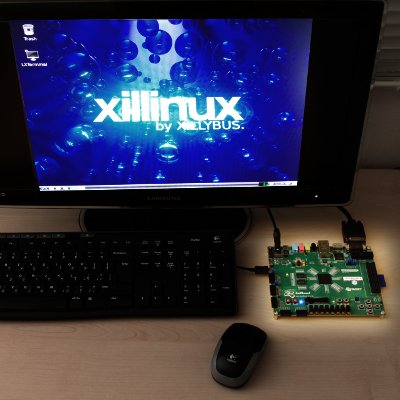
 The Xillinux distribution is a software + FPGA code kit for running a full-blown graphical desktop on the Z-Turn Lite, Zedboard and (non-Z7) ZyBo, attaching a monitor, keyboard and mouse to the board itself. Xillinux also supports MicroZed without the graphics.
This is not just a demo, but a kick-start development kit, making integration between the Linux host (PS) and the "FPGA part" (PL) simple, intuitive, and relatively effortless.
A demo configuration of the Xillybus IP core is included in the distribution's logic. A custom Xillybus IP core can be configured and downloaded at the IP Core Factory.
The full package, along with easy-to-follow setup instructions is free for download from this site. The setup takes 30-60 minutes, the majority of which consists of waiting for Xilinx' or Altera's tools to implement some logic components. No prior knowledge in FPGA nor Linux is necessary to carry out the setup process.
- Based upon Ubuntu LTS 16.04 for ARM, it makes the board behave like a PC with the SD card as its hard disk. Just plug a USB mouse and keyboard to the OTG port and use the board like any computer running Linux. Optionally (for Zedboard and ZyBo) connect loudspeakers and microphone to the board's dedicated plugs, using native sound applications.
- The VGA or HDMI output of the board functions as the computer's screen output, displaying both a Linux text console and the X-Windows desktop (Gnome).
- Comes with a PL ("FPGA") development kit for establishing Xillybus pipes with the host: Connect your application logic to plain FIFOs in the logic part, and use plain file operations to send and receive data. As a matter of fact, for just data acquisition and transmission, Linux' "cat" command-line utility will do the job. Setting this up requires no knowledge about the processor setup, Linux kernel, drivers etc.
- Also includes the Xillybus Lite kit for a bare-metal-like interface with peripherals.
- Native compilation of user applications and kernel modules on the board: Edit and compile your program on the board's desktop and processor, rather than using cross-compilers.
Note that MicroZed doesn't have outputs for sound or graphics, so related features are irrelevant to this board.
Required hardware:
(For Z-Turn Lite: There is a separate page on selecting the best fitting pieces of hardware)
- The board itself (Z-Turn Lite, Zedboard, ZyBo, or MicroZed) with their accessories
- A monitor capable of displaying VESA-compliant 1024x768 @ 60Hz with an analog VGA input (i.e. virtually any PC monitor).
- An analog VGA cable for the monitor
- A USB keyboard
- A USB mouse
- A USB hub recognized by Linux 4.4, if the keyboard and mouse are not combined in a single USB plug
- For Zedboard: A type A USB receptacle (female) to USB Micro B plug cable (included in Zedboard's kit)
- For Zedboard: A reliable SD card with 4GB or more, preferably Sandisk (the one that came with the board should not be used).
- For Z-Turn Lite, ZyBo, and MicroZed: A reliable MicroSD card with 4GB or more, preferably Sandisk.
- Recommended: A USB adapter between an SD/MicroSD card and PC, for writing the image and boot file to the card.
Download
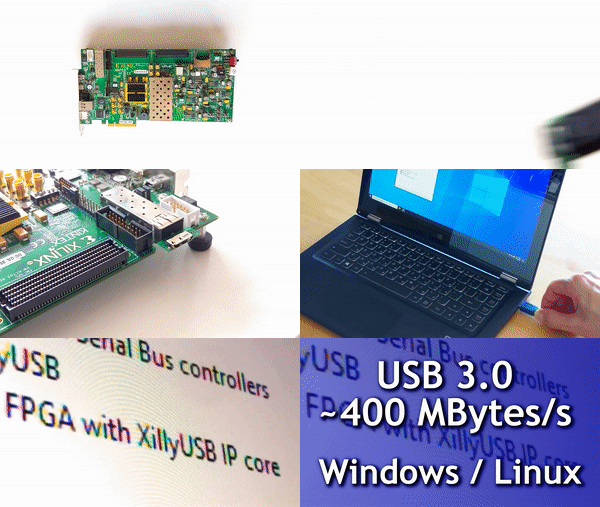
FPGA development board as a USB 3.0 device with the XillyUSB IP core. Read more...
You need to download two items, one for each bullet below. Then please refer to the "getting started" guides in the documentation page.
- Download the boot partition kit for your board: Z-Turn Lite, Zedboard, ZyBo or MicroZed.
- Click here to download the SD card image for Xillinux-2.0.
The instructions for what to do with these files are in the Getting Started guide for Zynq (Zedboard) (also in 中文, 日本語 and 한국어).
Note: The boot partition kits support Vivado 2016.4 and later.
To view Xillinux' file system without writing it to a hardware device, loop-mount the SD card image on any Linux machine as follows:
# mount -o loop xillinux-2.0a.img \
   -o offset=$((512*32768)) /mnt/tmp/
assuming that /mnt/tmp already exists as a directory. Note that the downloaded file must be gunzip'ed first, and that mounting requires root privileges.
All Zynq-related material for download on this page relates to Xillinux-2.0 for Zynq-7000, which was released in February 2018. Support for previous versions is given on this page. Information on the outdated Xillinux for SocKit can be found on this page.
Neither Zybo Z7 nor (non-Lite) Z-Turn boards are supported by Xillinux, and no such support is planned.