
2 General guidelines
2.1 Getting started
In principle, setting up a project for the Block Design Flow is as described in the respective Getting Started guide for the intended platform, using Vivado:
-
For Xillinux bundles: Getting started with Xillinux for Zynq-7000
-
For PCIe bundles: Getting started with the FPGA demo bundle for AMD
When following these guides, be sure to use the xillydemo-vivado.tcl script in the blockdesign/ subdirectory.
IMPORTANT:
This guide does not go along with the tutorial named “FPGA coprocessing for C/C++ programmers” on Xillybus’ website.
There are several differences in technical details as well as the example projects presented. In order to avoid confusion, it’s advised to stick
to either this guide (for Block Design Flow) or the website tutorial (for Verilog / VHDL design).
Generating and using the bitfile are done the same as in the Getting Started guides mentioned above: A bitfile can be generated immediately from the bundle “out of the box”, and the loopback tests described in these guides work the same. However, please note that the seekable stream xillybus_mem_8 doesn’t work in the Block Design Flow, as explained in section 4.3.
The Block Design Flow is different in that interfacing with Xillybus’ IP core takes place in Vivado’s block design tool: After generating the project, open the block design by choosing “Open Block Design” in Vivado’s left menu bar.
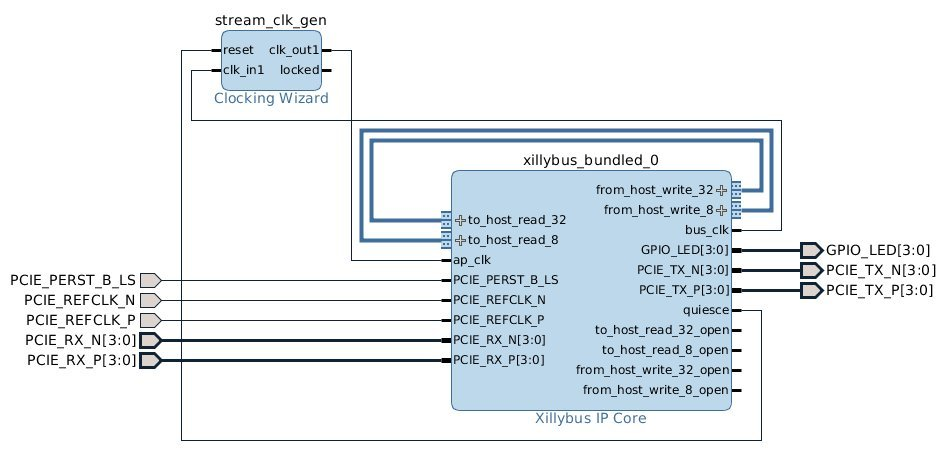
On designs based upon PCIe (i.e. not Xillinux), the following diagram is displayed:
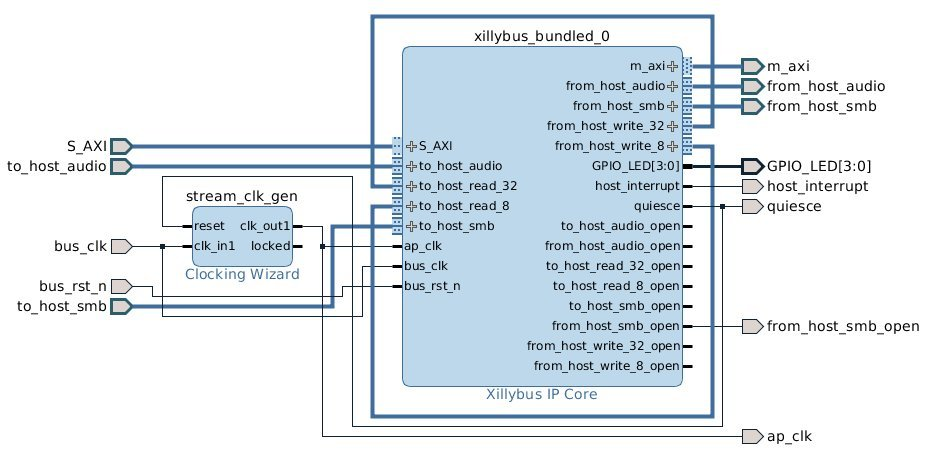
When Xillinux is used, “Open Block Design” opens the Zynq processor’s environment – this block design part should not be modified in tasks related to Xillybus. Rather, the block that is marked “blockdesign” should be opened (with a double-click), which displays the following block diagram:
2.2 Notable elements in the block design
There are a few key elements that are worth noting in the Xillybus block design:
-
Xillybus stream ports (“from_host_*” and “to_host_*”): These are standard AXI Stream ports, consisting of the minimal set of signals: TDATA, TVALID and TREADY. The name of each port in the block design is preceded with either “from_host” or “to_host” in order to mark the interface’s direction. The rest of the port’s name in the block design is the device file’s name, as presented at the host, minus the “xillybus” prefix.
For example, the device file named /dev/xillybus_write_32 on a Linux host, or \\.\xillybus_write_32 on a Windows computer can be accessed on the block design on the port named from_host_write_32.
-
Loopbacks: Initially, from_host_write_32 is connected to to_host_read_32, and from_host_write_8 is connected to to_host_read_8. This loops back any data written to the device file that is named xillybus_write_32 into xillybus_read_32. The same goes with the write_8 / read_8 pair. This loopback is what makes the “Hello world” test described in the Getting Started guides work.
For integrating with application logic, the respective loopback connection should be removed with Vivado’s block design GUI, and connections should be made with the application logic’s suitable AXI Stream ports.
-
In some cases, streams named xillybus_smb and xillybus_audio are connected to the hierarchy above, since these are used for supporting the board’s audio interface. These streams should be ignored (i.e. treated as the rest of the signals going to the processor design hierarchy in the block design).
-
“*_open” ports for each Xillybus stream: Each of the AXI Stream ports has a corresponding port with a _open suffix, which is high (’1’) when the relevant Xillybus device file is open on the host. This signal can optionally be used to reset any application logic that is attached to the stream, so it’s in a known state every time the device file is opened.
-
The Clocking Wizard (stream_clk_gen) block: Generates a clock for the application logic, which is based upon the clock that comes from Xillybus’ interface. All of Xillybus IP core’s AXI Stream ports are synchronous with this block’s output.
It’s recommended not to make any changes on this block except for the frequency of the output clock. In particular, the name of the block must remain (stream_clk_gen), as certain scripts that are related to the implementation of the design (the timing constraints) refer to this block’s output by its name.
See section 3.2 below.
-
External ports, e.g. GPIO_LEDS[0:3]: Ports that are connected to the hierarchy above the block design. These connections should not be altered, but their signals may be sampled by blocks within it. For example, in the Xillinux bundle, ap_clk goes to the upper hierarchy, but can be used inside the block design view as well.
Note that there are no ports for the mem_8 stream. Seekable streams are not presented in the block diagram. See section 4.3 for more about this.