
6 Specific programming techniques
6.1 Seekable streams
A synchronous Xillybus stream can be configured to be seekable. The stream’s position is presented to the application logic in the FPGA in separate wires as an address, so interfacing memory arrays or registers in the FPGA is straightforward, as shown in the demo bundle and example code.
This feature is useful in particular for setting up control registers in the FPGA. The synchronous nature of the stream ensures that the register in the FPGA is set before the low-level I/O function returns.
The following code snippet demonstrates how to write len bytes of data to address address in the memory or register space in the FPGA, assuming that these two variables are previously set.
  int rc, sent;

  if (lseek(fd, address, SEEK_SET) < 0) {
    perror("Failed to seek");
    exit(1);
  }

  for (sent = 0; sent < len;) {
    rc = write(fd, buf + sent, len - sent);

     if ((rc < 0) && (errno == EINTR))
       continue;

     if (rc <= 0) {
       perror("Failed to write");
       exit(1);
     }

    sent += rc;
  }
fd is also assumed to be the value returned from a function call to open(), where the file was opened for write or read-write, and buf pointing to the buffer containing data to be written.
This example is an extension of the example shown in paragraph 3.3.
The only special thing in this code is the function call to lseek(), which sets the address. Only the SEEK_SET option should be used as the third argument, when calling the lseek() function.
Subsequent function calls update the address in accordance with the I/O stream’s position, so there is no limitation on making multiple sequential writes after calling the function lseek().
For streams which are accessed as 16-bit or 32-bit words in the FPGA, the address given to lseek() must be a multiple of 2 or 4, respectively. The address presented to the application logic in the FPGA is maintained at all times as the stream’s I/O position (initially as given to lseek() ) divided by 2 or 4, respectively. For wider words, the same logarithmic rule applies.
The tell() function may return a correct position in the stream (i.e. the current address), but it’s not a reliable source for this information. If in doubt, call the function lseek() again.
lseek() can be used in the same way for reading data. See memwrite.c and memread.c in the demo application bundle (and their descriptions in Getting started with Xillybus on a Linux host).
6.2 Synchronizing streams in both directions
In certain applications, there’s a need to synchronize several streams, possibly in opposite directions. For example, a radio transmission system may be implemented on the host, receiving digital samples from an A/D converter, which is connected to an RF receiver. Likewise, it may be sending digital samples to a D/A converter, connected to an RF transmitter. In scenarios of this sort, it’s often needed to produce the digital samples for transmission so that the time of transmission is known in relation to the received samples. It may also be significant to know the exact time of a received signal.
Luckily, this can be implemented with simple FPGA logic. One such solution is to ignore the received digital samples until the first sample for transmission arrives to the FPGA:
The host starts with opening the stream for reading samples from the FPGA. This stream is idle at this stage, because the FPGA drops its reception samples. Then the host opens the stream for writing samples for transmission to the FPGA, and begins writing data to it. As the first sample arrives to the FPGA, it stops ignoring received samples, and starts sending them towards the host.
As a result, the first sample that will be read from the FPGA will match the first sample written to the FPGA. The application on the host can therefore match the timing of any sample for transmission with any sample received just by matching their position in the respective stream. A slight correction may be needed to compensate for latency in the FPGA and the delay of the A/D and D/A, but such a latency is constant and known.
The streams have to be kept continuous at all times. How to achieve this was discussed in section 4.
This solution is satisfactory if maintaining a relative time relationship between transmission and reception is enough. When the samples need to be synchronized with an external event or another time reference, the same principle of skipping samples can be adapted as necessary to achieve the desired result.
Monitoring how much data is held in the driver’s buffers at any given time is discussed in Xillybus FPGA designer’s guide, in the section named “Monitoring the amount of buffered data”.
6.3 Packet communication
Some applications require dividing the data stream into packets with varying length. The suggested solution uses two separate streams, and doesn’t require the sender of the data to know the length of the packet at the time it starts to submit the packet itself through the channel.
The trivial case of packets with a fixed and known length is solved simply by transmitting them one after the other on one single stream. The receiver at the other side merely reads that fixed number of words for each packet. This is the typical solution in a video frame grabber or video replay application.
For the case of varying length packets, let’s look at an upstream application, where the FPGA sends packets of bytes to the host. Let’s assume that the FPGA knows the length of the packet only when the last byte arrives.
The implementation on the FPGA’s side (i.e. the sender’s side) is as follows:
-
The FPGA writes all bytes in the packets to the first Xillybus stream.
-
The FPGA resets a byte counter when it writes the first byte in a packet, and increments it for each additional byte it writes.
-
When the last byte in a packet is written, the FPGA sends the counter’s value on the second Xillybus stream. It contains the packet’s length (minus one).
An important attribute of this solution is that the FPGA doesn’t need to store the entire packet before sending it. It merely passes on the data as it arrives.
The user application at the host runs a loop as follows:
-
Read one word from the second stream, containing the number of bytes in the next packet.
-
Allocate memory for a buffer of the requested size if necessary.
-
Read the given number of bytes into the buffer dedicated to the packet from the first stream.
Note that the host fetches the number of bytes to read before accessing the data, but the FPGA wrote these to the streams in the reverse order. The use of separate Xillybus streams allows this reversal.
A similar arrangement applies when the packets are sent from the host to the FPGA. The principle of using two streams, one for data and one for byte count remains. The FPGA’s application logic now gains the possibility to read the number of bytes from one stream before fetching the data from the other.
This arrangement is also extensible to passing other metadata in the non-data stream, e.g. the packet’s destination or routing in some network (which is sometimes not known, when the first bytes arrive).
6.4 Emulating hardware interrupts
In small microcontroller projects, it’s common to use hardware interrupts to alert the software that something has happened, and that the software needs to take some action. When the software runs as a userspace process in Linux, hardware interrupts are out of the question, and even software interrupts, like any asynchronous event, are not so pleasant to handle.
The suggested solution for a Xillybus-based system is to allocate a special stream for carrying messages. In its simplest form, a hardware interrupt is emulated by sending one single byte on that dedicated stream.
On the host side, the userspace application attempts to read data from the stream. The result is that when no “interrupt” is signaled, the application sleeps (blocking) until a byte arrives and wakes it up. The application handles the event, and then attempts to read another byte from the dedicated stream, hence going to sleep again if necessary, and so on.
To achieve a proper interaction between the main application and the interrupt routine, this dedicated stream can be read by a separate software thread or process. With this arrangement, the main code flows regardless of the thread that reads from the dedicated message stream, and the latter sleeps and wakes up, depending on messages sent.
A variant on this method uses the transmitted byte’s value to pass information about the nature of the emulated interrupt. Also, each message can be longer than a single byte, if that makes sense in the implementation.
This method may appear to be a waste of logic resources, but Xillybus was originally designed not to consume much logic for each stream added, in order to make solutions like this sensible.
6.5 Timeout
In certain applications, there’s a wish to limit the time an I/O operation may remain in blocking state, in particular when there’s a chance of some hardware failure leading to the data flow being stopped.
Xillybus itself has been tested extensively to verify that it’s never the reason why data is stopped this way, but data sources and data consumers can stop for various reasons.
The less preferred way to tackle this is using select() or pselect() functions. They are intended when waiting for multiple file descriptors is needed, but also have a timeout functionality. It’s not recommended to use these functions as their non-trivial interface may be a source of bugs, in particular in those special cases which a timeout is there to catch.
A more natural method is using Linux’ alarm feature: It’s a per-process timeout mechanism, which sends a signal (software interrupt) to the process when it expires. Please recall that a signal forces a read() or write() function call that is sleeping to return control immediately (see paragraphs 3.2 and 3.3). These functions return with a negative value and errno set to EINTR. In the previous examples, such interrupts were just a disturbance, but they are nevertheless useful for implementing a timeout.
Any process can receive several signals which are unrelated to its functionality. Receiving a signal is not an indication of a timeout condition in itself. There are several ways to tell, but the safest way is not to depend on that question at all: If the I/O operation took more than a certain amount of time, it’s a timeout. So the most straightforward strategy is to measure time, as in the example shown next, which is based upon the one calling the function read() from paragraph 3.2.
The typical list of include files for this example is a bit long:
#include <stdio.h>
#include <signal.h>
#include <unistd.h>
#include <stdlib.h>
#include <errno.h>
#include <sys/types.h>
#include <sys/stat.h>
#include <fcntl.h>
#include <time.h>
Specific to this example, the following declarations are needed:
struct timespec before, after;
double elapsed;
The while-loop for reading data now starts as follows:
while (1) {
  if (clock_gettime(CLOCK_MONOTONIC, &before)) {
    perror("Failed to get time");
    exit(1);
  }

  alarm(2);
  rc = read(fd, buf, numbytes);

  if (clock_gettime(CLOCK_MONOTONIC, &after)) {
    perror("Failed to get time");
    exit(1);
  }
The time is measured before and after calling the function read() with clock_gettime(). This is the preferred function for measuring time differences, since it has access to a monotonic time measurement (as opposed to the system clock, which is modified by system utilities). Note that this function may require that the -lrt flag is added to gcc’s arguments, so it loads the necessary library.
The function call to alarm() requests a signal after two seconds (the argument is the number of seconds). There is only one alarm timer for each process, so care must be taken not to override another use of the same timer, e.g. sleep() in some Linux implementations.
This code follows:
  elapsed = (after.tv_sec - before.tv_sec);
  elapsed += (after.tv_nsec - before.tv_nsec) / 1000000000.0;

   if (elapsed >= 2.0) {
     fprintf(stderr, "Timed out\n");
     exit(1);
   }
The time difference is calculated and stored in elapsed. It’s a double-precision floating point variable to avoid word length portability issues in this simple example. But this can be done with an integer as well.
The condition is simple: If two seconds or more have elapsed between the time measurements, it’s a timeout. The reason why read() returned isn’t examined. It may be a signal or that data arrived eventually, but too late. In either case, it’s an error.
Note that the function call to alarm() was made after the first time measurement took place, so a timeout is guaranteed to make the time differences at least two seconds long.
The while-loop continues just like before:
  if ((rc < 0) && (errno == EINTR))
    continue;

  if (rc < 0) {
    perror("read() failed");
    exit(1);
  }

  if (rc == 0) {
    fprintf(stderr, "Reached read EOF.\n");
    exit(0);
  }
}
As seen above, signals are still ignored. If the timer woke the process up, the time difference should reveal the timeout condition and exit.
Note that this method of implementing timeout is based upon a UNIX signal, which becomes a complicated issue in a multi-threaded environment. If multiple threads are deployed, it’s easiest to make one of them the watchdog for the others.
Also note that in the example above, a timeout causes the process to terminate, which is easier to implement with a signal handler that performs this operation. The method shown above is more suitable when the corrective response is performed within the running process.
For higher precision of the timeout interval, consider using setitimer() instead.
6.6 Coprocessing / Hardware acceleration
Coprocessing (also known as hardware acceleration) is a technique that allows applications to take advantage of the logic fabric’s flexibility to perform certain operations faster, cheaper, with a lower energy consumption or otherwise more efficiently than a given processor. Whatever the motivation is, an efficient data transmission flow is crucial to make coprocessing an eligible solution.
It’s important to realize that the data flow in a coprocessing-based application is fundamentally different from the common programming data flow. To illustrate this difference, let’s take, for example, a computer program that needs to calculate the square root of a number in floating point representation.
The programmer’s straightforward way is to pass the number as an argument to sqrt(), call it, and wait until the function returns.
Suppose that it’s desired to calculate the square root in the FPGA’s logic fabric instead. A common mistake is to replace sqrt() with a special function that sends the value for calculation to the FPGA, waits for it to complete, and then returns with the result. Even though this is indeed a simple drop-in replacement for sqrt(), it’s most likely going to be slower and otherwise less efficient than the original sqrt(): The time it takes for the data to travel across the bus in both directions, plus the time it takes for the FPGA to make the calculation, is probably considerably longer than the processor cycles needed by sqrt(). Having said that, calculating the square root on the FPGA can be much faster, if the data flow is designed correctly.
In order to overcome the latencies imposed by the bus and the FPGA’s logic, there’s a need to reorganize the software. In particular, the tasks in a program with a single thread need to be split into two or more threads (or processes). If multiple threads are not possible or desirable, other programming techniques can be utilized to mimic the behavior of multi-threading, but the programming paradigm is nevertheless multi-threaded.
Returning to the example of sqrt(), the call to this function is divided into two threads: The first thread sends the data for square root calculations to the hardware (or some other form of data structure representing the request for operation). The second thread receives the results from the hardware and continues the processing from that point in the algorithm.
This doesn’t seem to make much sense when looking at a single piece of data, but the motivation for coprocessing implies that there are many data items to handle. So the first thread sends a flow of data for calculation, and the second thread receives a flow of results.
This technique of pipelining minimizes the effect of the hardware’s latency, since neither of the threads is effectively waiting for this latency. Instead, the latency influences the number of processing items that are between the two threads – but the throughput depends only on the processing capabilities of the two threads and the FPGA logic.
The following conceptual drawing summarizes the idea.
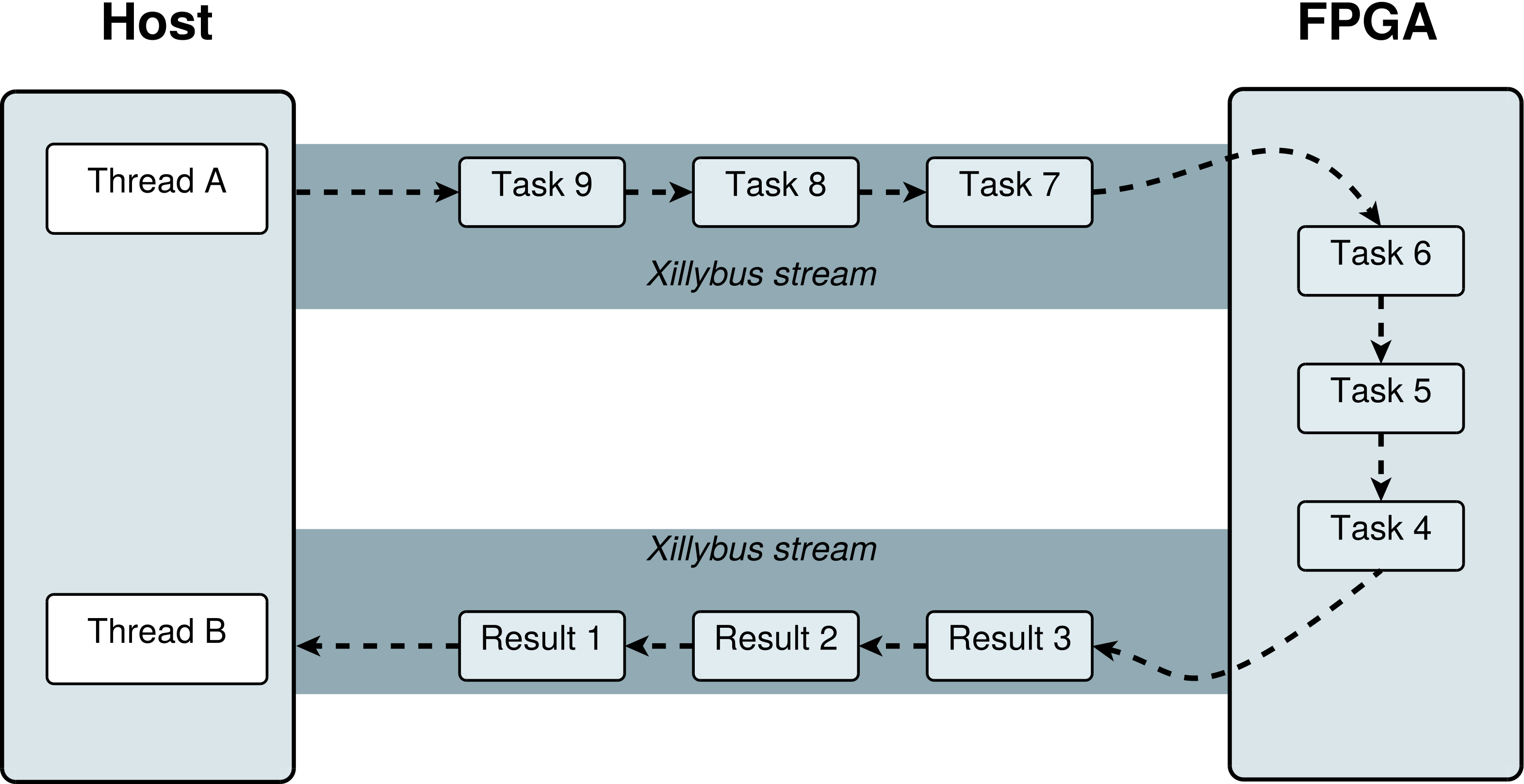
The accelerated calculation of sqrt() is a relatively simple example, but it covers much of the challenge in utilizing coprocessing. Almost always, large parts of the computer program need to be rewritten so that everything is driven by the pipeline’s data flow.
Another issue to be aware of is that since Xillybus works with read() and write(), it’s possibly beneficial to group several data items for calculation before writing them to the stream towards the FPGA. Likewise, attempting to read more than one result item in each read() call may improve performance. The rationale behind this is that read() and write() are system calls with a certain overhead. If the data elements are small and transmitted at a high rate, these system calls’ overhead can be substantial. The case with sqrt() is a good example for this: A double float is typically 8 bytes long. An I/O system call of this length is quite inefficient, so concatenating several double float elements for a single system call will make a difference.
It’s also worth mentioning that not all applications involve data chunks of constant lengths. For example, using coprocessing for calculating hashes (e.g. SHA1) of arbitrary strings is likely to involve data elements for processing with different lengths. Section 6.3 suggests a solution for this.