
6 Vivado HLS integration
6.1 Overview
This section demonstrates the compilation of a simple C function into an IP block, and how it’s then integrated into Xillybus’ Block Design flow.
The example project, which this section is based upon, can be downloaded at
https://xillybus.com/downloads/hls-axis-starter-1.0.zip
It’s recommended to unzip the downloaded file into a directory that is easily related to the Xillybus project, as it can’t be moved at later stages.
It’s important to distinguish between two different kind of C sources in the example project:
-
Code for execution: Runs on a computer or embedded platform (“host”), like any computer program, and uses the FPGA to offload certain operations.
In the example project, the sample files can be found under the host/ subdirectory.
-
Code for synthesis: Intended for translation into logic by Vivado HLS.
In the example project, it can be found at coprocess/example/src/main.c
Unlike common C/C++ programming, the host program doesn’t call the synthesized function. Rather, it organizes the data needed for executing the function in a data structure and transmits it to the synthesized function, using a simple API, which is described further on. At a later stage, it collects the return data as a data structure sent from the synthesized function with a similar API.
6.2 HLS synthesis
The example code in C used in this section is outlined in section 6.4.
Start Vivado HLS, and open the HLS project: Pick “Open Project” on the welcome page, navigate to where the HLS project bundle was unzipped to, and choose the folder with the name “coprocess”.
Change the project’s part number: Pick Solution >Solution Settings... >Synthesis and change the “Part Selection” to the intended FPGA.
Start a compilation of the project (“synthesize”) by picking Solution >Synthesis >Active Solution (or click on the corresponding icon on the toolbar). A lot of text will appear on the console, including several warnings (which is normal). No errors should occur.
A successful compilation is easily recognized by the following message among the last few lines in HLS’ console tab:
Finished C synthesis.
A synthesis report will also appear above the console tab only when the synthesis was successful.
For more information about Vivado HLS, please refer to its user guide (UG902).
6.3 Integration with the FPGA project
In Vivado HLS, select Solution >Export RTL and pick “IP Catalog” as Format Selection. For “Evaluate Generated RTL” choose Verilog, and don’t check either checkboxes under this. Click OK.
This can take several minutes, and ends with something like
Finished export RTL.
Now open the Xillydemo project (as set up in section 2.1) in Vivado (i.e. not in Vivado HLS), and open the Block Design. When using Xillinux (Zynq), open the block named “blockdesign”.
Add the HLS IP block as follows: Right-click somewhere in the block design diagram area, and pick “IP Settings...”. Under the “Repository Manager” tab, click the green plus sign for adding a repository. Navigate to and select the same “coprocess” directory that was chosen in section 6.2 to open the HLS project. Vivado should respond with a pop-up window indicating that one repository was added. Click on “OK” button twice to confirm.
Now add the IP block into the block design: Once again, right-click somewhere in the block design diagram area. Pick “Add IP...” and select the Xillybus_wrapper IP from the list (typing “wrapper” in the search box is likely to make this easier).
A new block, named xillybus_wrapper_0, will appear in the diagram. Disconnect the wire going between to_host_read_32 and from_host_write_32 (i.e., disconnect the loopback).
Then connect the xillybus_wrapper block as follows:
-
data_in with from_host_write_32
-
data_out with to_host_read_32
-
ap_rst_n with to_host_read_32_open
-
ap_clk with ap_clk (which is also the Clocking Wizard’s clk_out1 output)
The result should be something like this (shown for a Xillinux-based block design):
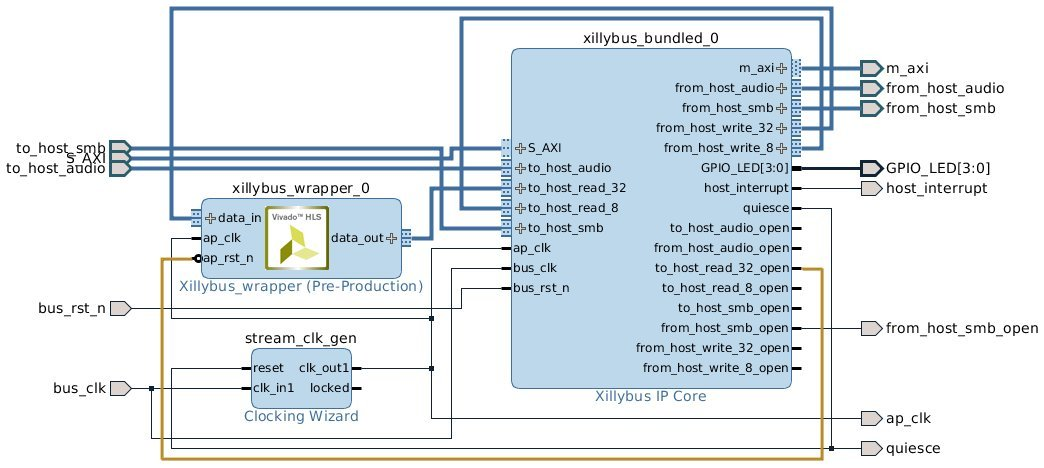
The connection between ap_rst_n and to_host_read_32_open keeps the logic in reset state inside the block of xillybus_wrapper, unless the xillybus_read_32 device file is opened on the host (to_host_read_32_open is low when the file isn’t opened, and the reset input is active low). Assuming that the software running on the host opens this device file before attempting to communicate with this block, this ensures a consistent response from the logic each time the software is run.
At this point, an implementation can be carried out to obtain the bitstream: At the bottom of Vivado’s window, pick the “Design Runs” tab, right-click over “synth_1” and pick “Reset Runs”. Confirm resetting synth_1.
Then click “Generate Bitstream” at the left bar.
6.4 The example synthesis code
To clarify how HLS works with Xillybus, the example demonstrates the calculation of a trigonometric sine and a simple operation with an integer, both covered in a simple custom function, mycalc().
coprocess/example/src/main.c starts as follows:
#include <math.h>
#include <stdint.h>

extern float sinf(float);

int mycalc(int a, float *x2) {
  *x2 = sinf(*x2);
  return a + 1;
}
As usual, there are a couple of #include statements. The “math.h” inclusion is necessary for the sine function.
And there’s the simple function, mycalc() which takes the role of the “synthesized function”. It’s a very simple function that demonstrates arithmetic operations with floating point as well as integer. The High-Level Synthesis Guide UG902 gives more information on how to implement more useful tasks.
Next in main.c, there’s the wrapper function, xillybus_wrapper(), which is the bridge between the synthesized function and Xillybus, and is hence responsible for packing and unpacking the data going back and forth.
In the example’s case, it accepts numbers in integer and floating point formats from the host through a data stream, which is represented by the “data_in” argument. It returns the integer plus one and the (trigonometric) sine of the floating point number, using the “data_out” argument.
void xillybus_wrapper(int *data_in, int *data_out) {
#pragma AP interface axis port=data_in
#pragma AP interface axis port=data_out
#pragma AP interface ap_ctrl_none port=return

  uint32_t x1, tmp, y1;
  float x2, y2;

  // Handle input data
  x1 = *data_in++;
  tmp = *data_in++;
  x2 = *((float *) &tmp); // Convert uint32_t to float

  // Run the calculations
  y1 = mycalc(x1, &x2);
  y2 = x2; // This helps HLS in the conversion below

  // Handle output data
  tmp = *((uint32_t *) &y2); // Convert float to uint32_t
  *data_out++ = y1;
  *data_out++ = tmp;
}
xillybus_wrapper() is declared with two pointers, both to a variable of type int. These function arguments turn into two AXI Stream ports of the to-be IP block for inclusion in the block design: Each of them has a #pragma statement informing HLS that they should be considered interfaces of type “axis”.
“#pragma AP” and “#pragma HLS” are interchangeable – the former is based upon the C Synthesizer’s previous name (Auto Pilot), and the latter is seen in AMD’s recent documentation.
Since “int” is considered a 32-bit word by HLS, the respective AXI Stream interfaces will have a 32 bit wide data interface.
It’s of course possible to change the list of arguments as well as the pragmas to obtain any set of AXI Stream inputs and outputs.
The pragma declaration for ap_ctrl_none tells the compiler not to generate a port for the (nonexistent) return value.
And next, there’s some code for “execution”: The input data is fetched. Each *data_in++ operation fetches a 32-bit word originating from the host. In the code shown, the first word is interpreted as an unsigned integer, and is put in x1. The second word is treated as a 32-bit float, and is stored in x2.
Then there’s a function call to mycalc(), the “synthesized function”. This function returns one result as its return value, and the second piece of data goes back by changing x2.
The wrapper function copies the updated value of x2 into a new variable, y2. This may appear to be a redundant operation, which it would have been, had the compilation of this code been intended for execution on a processor. When using HLS, this is however necessary to make the compiler handle the conversion to float later on. This reflects a somewhat quirky behavior of the HLS compiler, but this is one of the delicate issues of using a pointer: Even though a memory array and a pointer to it are defined in the C code, the HLS compiler doesn’t generate any of them. The use of the pointer is just a hint on what we want to accomplish, and sometimes these hints need to pushed a bit.
Finally, the results are sent back to the host: Each *data_out++ sends a 32-bit word to the computer, with due conversion from float.
Note that the *data_in++ and *data_out++ operators don’t really move pointers, and there is no underlying memory array. Rather, these symbolize moving data from and to the AXI stream interfaces (and eventually from and to Xillybus streams). Hence, the only way the “data_in” and “data_out” variables are used is *data_in++ and *data_out++ (the High-Level Synthesis Guide offers other possibilities, in particular fixed sized arrays).
Also note that since this code is translated into logic, and not run by a processor, the only significance of these C commands is to produce the expected output stream of data given the input stream of data. There is however no promise on when the data is emitted (except for a range of possible latencies, given in HLS’ report).
Accordingly, the order of assignments of the input data is important in the sense that it enforces how the incoming data is interpreted. On the other hand, since the first output that is sent, y1, depends only on x1, which is the first input arriving, it’s allowed that the first output will be sent before the second input has arrived. This contradicts the intuitive sequential nature of code execution, but is meaningless in the context of hardware acceleration, as the overall result is the same.
Furthermore, if the data_in AXI stream is constantly fed with data, the wrapper function “runs” repeatedly, as if it said:
  while (1) // This while-loop isn't written anywhere!
    xillybus_wrapper(data_in, data_out);
New data is fetched by virtue of the *data_in++ commands as soon as possible, quite likely filling the logic’s internal pipeline (which is longer than 70 stages in the example project, according to HLS’ report). So unlike a processor’s execution of the code, which would have fetched a pair of words, processed them, emitted two output words and only then fetched the second pair of words, the HLS interpretation may very well fetch 70 words at data_in before anything comes out on the data_out AXI stream.
6.5 Modifications on the C/C++ code for synthesis
Additional AXI Stream ports can be created by adding arguments to the wrapper function, and declaring these as interface ports, as shown in the example.
It’s of course possible to make other changes in the C code of the example design.
It’s recommended to implement the I/O in the same style as shown with *data_in++ and *data_out++, or refer to the High-Level Synthesis Guide (UG902) for other possibilities. It’s also a recommended source for learning about coding techniques.
IMPORTANT:
Don’t just click “Generate Bitstream” in Vivado after making changes: Launching a repeated implementation of a bitstream without
upgrading the block as detailed below, is likely to result in a seemingly successful implementation of the bitfile, but based upon an outdated
version of the HLS block.
After changes have been made in the sample project, start over from “HLS synthesis” in section 6.2, and go all the way to implementation with Vivado, plus updating the HLS block in Vivado.
In other words:
-
Vivado HLS: Run a compilation of the project in HLS. The HLS synthesizer always cleans up the files that are generated by previous compilations, before starting a new one.
-
Vivado HLS: Export into an IP Catalog bundle.
-
In Vivado (not Vivado HLS), upgrade the block of xillybus_wrapper (actually, update it following its change): Open the block design view, and respond to the message at the top of the page, which says that the block needs upgrading. If this message isn’t found, type “report_ip_status -name status” at the Tcl Console. Click on the “Upgrade Selected” button at the bottom. This will be followed by a dialog box confirming the successful upgrade, and one requesting to generate output products. Click “Skip” on the second dialog box.
-
Vivado: Verify that the design runs were invalidated: At the bottom of Vivado’s window, pick the “Design Runs” tab. It should say Synthesis Out-of-date in the Status column for synth_1.
-
Vivado: Unless the design runs were invalidated, attempt the following: Refresh the IP catalog: Right-click somewhere in the block design diagram area, and pick “IP Settings...”. Under the “Repository Manager” tab, click the “Refresh All” button at the bottom. It may also be necessary to click “Clear Cache” on the “General” tab of the same dialog box. After this, go back to upgrading the block of xillybus_wrapper.
None of these actions are necessary if the design runs were found invalidated in the previous item above.
-
Vivado: Reset the synth_1 run
-
Vivado: Generate bitstream
6.6 simple.c: An example of a host program
In the example project, there are sample host programs as two C files: simple.c and practical.c. These demonstrate the host side of the project.
Both are written for a Linux host, for compilation with e.g.
# gcc -O3 -Wall simple.c -o simple
They are however easily adapted for Windows (see below).
IMPORTANT:
simple.c should not be used as an example for actual host programming, in particular due its following drawbacks:
Only one single element is handled. Looping on the write() and read() pair of function calls will result in poor performance.
The write() and read() operations’ return values must be checked for proper operation. This has been omitted for simplicity, but
renders the program unreliable.
Section 6.7 outlines better coding
techniques.
The simple.c file starts with #include statements:
#include <stdio.h>
#include <unistd.h>
#include <stdlib.h>

#include    <sys/types.h>
#include    <sys/stat.h>
#include    <fcntl.h>
#include    <stdint.h>
This is followed by the classic declaration of the main() function, along with declarations of some variables:
int main(int argc, char *argv[]) {
  int fdr, fdw;

  struct {
    uint32_t v1;
    float v2;
  } tologic, fromlogic;
The struct variables will be discussed below.
The program starts with opening the two device files, which behave like named pipes, and are used for communication with the logic: /dev/xillybus_read_32 and /dev/xillybus_write_32. Recall from the setting up of the Xillybus bundle that these two files are generated by Xillybus’ driver.
As pointed out in section 6.3, ap_rst_n is connected to to_host_read_32_open in the block design diagram, so opening /dev/xillybus_read_32 gets the logic out of reset. This is why both files are opened before data transmission.
  fdr = open("/dev/xillybus_read_32", O_RDONLY);
  fdw = open("/dev/xillybus_write_32", O_WRONLY);

  if ((fdr < 0) || (fdw < 0)) {
    perror("Failed to open Xillybus device file(s)");
    exit(1);
  }
Next, to the actual execution. The “tologic” structure is populated with a couple of values for transmission to the logic, after which it’s written directly from memory to xillybus_write_32. Effectively, this writes 8 bytes, or more precisely, two 32-bit words. The first is the integer 123 put in tologic.v1, and the second is the float in tologic.v2. The tologic structure was hence set up to match the logic expectation of data: One integer by the first *data_in++ instruction, and one float by the second.
  tologic.v1 = 123;
  tologic.v2 = 0.78539816; // ~ pi/4

  // Not checking return values of write() and read(). This must
  // be done in a real-life program to ensure reliability.

  write(fdw, (void *) &tologic, sizeof(tologic));
  read(fdr, (void *) &fromlogic, sizeof(fromlogic));

  printf("FPGA said: %d + 1 = %d and also "
         "sin(%f) = %f\n",
         tologic.v1, fromlogic.v1,
         tologic.v2, fromlogic.v2);
Recall from section 6.4 that the wrapper code fetches two 32-bit words from the data_in stream. The first word goes to “x1”, and the second to “tmp”, and then “tmp” is immediately converted into a float. This matches the two 32-bit elements of the “tologic” structure.
This is followed by reading back the data from the FPGA. The same principle applies for “fromlogic”.
simple.c ends with a common wrap-up:
  close(fdr);
  close(fdw);

  return 0;
}
It is crucial to match the amount of data sent to /dev/xillybus_write_32 with the number of *data_in++ operations in the wrapper function. If there is too little data sent, the synthesized function may not execute at all. If there’s too much, the following execution will probably be faulty.
In this example, the same structure format was chosen for “tologic” and “fromlogic”, but there’s no need to stick to this. It’s just important that the data sent and received is in sync with the wrapper function’s number of *data_in++ and *data_out++ operations.
The execution of this program should be
# ./simple
FPGA said: 123 + 1 = 124 and also sin(0.785398) = 0.707107
Finally, a note to Windows users, who may need to make all or some of the following adjustments:
-
Change the file name string from “/dev/xillybus_read_32” to “\\\\.\\xillybus_read_32” (the actual file name on Windows is \\.\xillybus_read_32, but escaping is necessary). The second file name changes to “\\\\.\\xillybus_write_32”.
-
Replace the #include statement for unistd.h with io.h
-
Replace the function calls to open(), read(), write() and close() with _open(), _read(), _write() and _close()
6.7 practical.c: A practical host program
The simple.c example outlines data exchange in a concise manner, but several changes are required in practical system:
The following differences are most notable:
-
Rather than generating a single set of data for processing, an array of structures is allocated and sent. Likewise, an array of data is received from the logic. This reduces the I/O overhead as well as the impact of latencies, which is caused by software and hardware. This is a crucial method for gaining a performance improvement with hardware acceleration.
-
The program forks into two processes, one for writing and one for reading data. Making these two tasks independent prevents the processing from stalling due to lack of data to process by either side. This independence can be achieved with threads (in particular in Windows) or using the select() function call as well.
-
The read() and write() function calls are made correctly, so as to ensure reliable I/O. The while-loops that are added for this purpose may appear cumbersome, but they are necessary to respond correctly to partial completions of these function calls (not all bytes read or written) which is a frequent case under load. The EINTR error is also handled as necessary to react properly to POSIX signals, which may be sent to the running processes, possibly accidentally.
Now to a brief walkthrough of practical.c. First, headers:
#include <stdio.h>
#include <unistd.h>

#include   <stdlib.h>
#include   <errno.h>
#include   <sys/types.h>
#include   <sys/stat.h>
#include   <fcntl.h>
#include   <stdint.h>
And the same structure, plus defining N, the number of elements per chunk of data.
#define N 1000

struct packet {
   uint32_t v1;
   float v2;
};
A common main() function definition and some variables:
int main(int argc, char *argv[]) {

  int fdr, fdw, rc, donebytes;
  char *buf;
  pid_t pid;
  struct packet *tologic, *fromlogic;
  int i;
  float a, da;
Files opened like before:
  fdr = open("/dev/xillybus_read_32", O_RDONLY);
  fdw = open("/dev/xillybus_write_32", O_WRONLY);

  if ((fdr < 0) || (fdw < 0)) {
    perror("Failed to open Xillybus device file(s)");
    exit(1);
  }
The actual execution begins with a fork() into two processes.
  pid = fork();

  if (pid < 0) {
    perror("Failed to fork()");
    exit(1);
  }
The father process prepares the data for processing and writes it towards the FPGA. It closes the read file descriptor, since it’s not used by this process. Keeping it open will make the device file remain open until both processes have closed their file descriptor (or exited), which isn’t the desired behavior here.
  if (pid) {
    close(fdr);

    tologic = malloc(sizeof(struct packet) * N);
    if (!tologic) {
       fprintf(stderr, "Failed to allocate memory\n");
       exit(1);
    }
Next, filling an array of structs with data. This explains why it made sense to define a structure for each set of data for processing.
    // Fill array of structures with just some numbers
    da = 6.283185 / ((float) N);

     for (i=0, a=0.0; i<N; i++, a+=da) {
       tologic[i].v1 = i;
       tologic[i].v2 = a;
     }

    buf = (char *) tologic;
Note that “buf” is defined as a pointer to a buffer of char, pointing at the array of structures. This conversion is required, since the while-loop that sends the data treats the buffer as any chunk of data for transmission.
Next, the while-loop for writing data. It may seem unnecessarily complicated, but is the shortest way to ensure data is written reliably. It’s suggested to adopt this code as is in practical applications.
    donebytes = 0;

     while (donebytes < sizeof(struct packet) * N) {
       rc = write(fdw, buf + donebytes,
                  sizeof(struct packet) * N - donebytes);

         if ((rc < 0) && (errno == EINTR))
           continue;

         if (rc <= 0) {
           perror("write() failed");
           exit(1);
         }

         donebytes += rc;
    }
In this example, only a single chunk is sent (and received on the other end). In practical code, it’s correct to loop on the two pieces of code above.
Performance tests have shown that a chunk size of 32 kBytes usually gives the best results.
As only one chunk is sent in this example, the process exits. Sleeping during one second before closing the file ensures that the logic doesn’t reset before all data has been drained from it. This is meaningless when the block design is as shown in section 6.3, since ap_rst_n goes to to_host_read_32_open, and from_host_write_32_open isn’t connected at all.
Nevertheless, this demonstrates a good convention of not closing the file descriptor immediately, unless quitting fast is required. This can save some confusion when the project becomes more elaborate.
    sleep(1); // Let the output drain

    close(fdw);
    return 0;
Next we have the child process, starting in a similar way:
  } else {
    close(fdw);

     fromlogic = malloc(sizeof(struct packet) * N);
     if (!fromlogic) {
       fprintf(stderr, "Failed to allocate memory\n");
       exit(1);
     }

    buf = (char *) fromlogic;
Once again, this is the recommended way to read data from a device file:
    donebytes = 0;

     while (donebytes < sizeof(struct packet) * N) {
       rc = read(fdr, buf + donebytes,
                 sizeof(struct packet) * N - donebytes);

         if ((rc < 0) && (errno == EINTR))
           continue;

         if (rc < 0) {
           perror("read() failed");
           exit(1);
         }

         if (rc == 0) {
           fprintf(stderr, "Reached read EOF!? Should never happen.\n");
           exit(0);
         }

         donebytes += rc;
    }
And then data is printed out:
    for (i=0; i<N; i++)
      printf("%d: %f\n", fromlogic[i].v1, fromlogic[i].v2);

     sleep(1); // Let the output drain

     close(fdr);
     return 0;
  }
}
Once again, the process sleeps for one second before closing the file descriptor, and once again, it isn’t necessary in this specific case: Closing the file descriptor will indeed reset the logic, but it’s harmless in this case because all output has been fetched, by the time this point is reached.
As mentioned before, unless quitting quickly is beneficial, this one second sleep may save confusion, in particular if other output streams are generated, e.g. for debugging.
6.8 Design considerations
6.8.1 Working with multiple AXI streams
The example project shows the basic case of one stream in each direction. It’s however trivial to add streams for input and/or output on the IP block by adding arguments to the wrapper function, along with pragmas for declaring these as AXI streams.
For example, three input streams instead of one:
void xillybus_wrapper(int *d1, int *d2, int *d3, int *data_out) {
#pragma AP interface axis port=d1
#pragma AP interface axis port=d2
#pragma AP interface axis port=d3
#pragma AP interface axis port=data_out
#pragma AP interface ap_ctrl_none port=return


  *data_out++ = thefunc(*d1++, *d2++, *d3++);

}
Adding streams to the Xillybus IP core is equally simple, by configuring a custom IP core, as explained in section 5.
Additional streams can be useful in a variety of scenarios, among others:
-
Sending data and meta information in separate streams. For example, if the data needs to be divided into packets, send their lengths in one dedicated stream, and the data in another. This allows sending the beginning of the packet before its length is known.
-
Sending data that is naturally arranged separately, e.g. pixel scanning of different images (more on this below).
-
For debugging: Sending intermediate data to the host for verification.
When working with multiple streams, it’s important to keep them all in mind: The logic’s execution flow may stall if any input stream lacks data, or if an output stream’s respective device file isn’t opened (or suffers overflow with data). This is important in particular if an output stream is intended for debugging: When using the system for normal operation, it’s easy to forget the stream that is intended for debugging. Because the data from this stream isn’t consumed, this leads to a confusing halt of execution, usually after a few data cycles.
It’s often sensible to feed the logic hardware with data in ways that may seem unsuitable at first sight. For example, the three-input example shown above can be useful for an image processing algorithm that requires three elements of data for each operation: Suppose that an image is scanned from left to right, top to bottom. For the sake of generating pixel output, the algorithm needs the respective pixels from two previous images along with the current image’s pixel. In such a case, it possible to send the current image through one stream to the FPGA, and the two previous images through two other streams in parallel.
This may seem as a waste of I/O data bandwidth and a lot of unnecessary memory copying. In particular, it may feel wrong that the processor is involved so much in “shuffling data”. Subjective perceptions aside, the implementation of memory copying is a highly optimized task on every modern processor architecture, and the processor is often loaded with other application-related tasks, which makes the memory copying load negligible.
So even though feeding the logic with data directly is suboptimal from a resource utilization point of view, the extra load on the processor is usually rather small, given that it usually has other heavy-duty tasks to handle. This is often a reasonable price for simplifying the design significantly.
6.8.2 The application clock’s frequency
The logic generated by HLS is driven by the application clock of the block design, which is generated by the block of stream_clk_gen. As this clock is the timebase for the logic, its execution rate is proportional to the clock’s frequency. Unless the data transport of the AXI stream ports become a bottleneck, a higher application clock frequency means a proportional speedup of the processing throughput.
There’s however a limit to how high the application clock’s frequency can go, depending on the logic resources of the FPGA and how they have been utilized to implement the required tasks. These are the relevant milestones in the design process:
-
Vivado HLS allows the user to set the intended frequency of the clock for the design, specifying the desired frequency for the application clock (with Solution >Solution Settings). This parameter is used by HLS merely as a hint, allowing it to make extra efforts for producing faster logic when necessary and possible.
-
When Vivado HLS finishes its compilation, it presents an estimation of the clock’s frequency that is likely to be attainable (under “Timing” in the “Performance Estimates” section of the Synthesis tab of HLS’ GUI).
-
The user sets the frequency of the application clock in Vivado’s block design, as described in section 3.2 (section 3.2.2 in particular). The natural choice is the clock’s frequency, as estimated in item 2, or lower. Note that this is done in Vivado, not Vivado HLS.
-
When Vivado finishes the implementation of the entire design into a bitstream for the FPGA, it informs the user whether it was successful in organizing the logic to satisfy all requirements that are related to the clock. That includes satisfying the clock’s frequency, as set in item 3.
So it boils down to the last milestone, and if Vivado was able to meet the timing constraints that relate to the chosen frequency of the application clock in item 3.
The default clock period in HLS as well as stream_clk_gen, is 10 ns (100 MHz). It’s often best to remain with this choice, unless:
-
Vivado fails to meet timing constraints, in which case a slower clock should be chosen.
-
If there’s a motivation to increase the processing throughput, in which case attempts to require a faster clock should be made. This is often an iterative process of tuning the clock’s frequency as well as making changes in the design itself and HLS pragmas for reaching improved results.
6.8.3 Resetting the logic
As the C/C++ code is translated into logic, it doesn’t actually run, but rather maintains a state of its own execution flow. In order to make the logic mimic the behavior of a processor’s execution of the program, it’s among others essential to make sure that the execution starts from the beginning of the program. This is achieved by resetting the logic.
The intuitive behavior, in most cases, is that the program in the FPGA starts from its beginning when the host’s program starts executing. Since any process that runs on the host opens the device files before accessing them, and these files are necessarily closed at least when the process terminates, it’s natural to reset the logic when one or more device files are closed.
Each stream in Xillybus IP Core has an *_open port, which is high (’1’) when the respective device file is opened. Since the HLS block has an active-low reset input ap_rst_n (by default), connecting the *_open output directly to the ap_rst_n input yields the desired result: When the file is closed, the *_open signal is low (’0’). This holds the logic in the reset state.
It may be desirable to combine several *_open ports in order to hold the logic until all device files are opened, or until any of them is opened. This is achieved by adding simple logic gate blocks, which are available on Vivado’s IP catalog. The choice of how to generate the reset signal depends on how the host program is set up.
Either way, it’s important to make sure that the host doesn’t attempt to exchange data with an HLS block until it has opened device files as required to ensure that the reset signal becomes inactive. For simplicity, it’s best to open all device files that are relevant to an HLS block before starting any data exchange with it, and close them all for cleaning up.