
A Internals: How streams are implemented
A.1 Introduction
Even though using Xillybus doesn’t require any understanding of its implementation details, some designers prefer knowing what happens under the hood, whether for curiosity or for verifying the eligibility of a certain solution.
This section outlines the main techniques implemented for creating continuous streams based upon DMA buffers. It applies to Xillybus for PCIe / AXI, but not to XillyUSB, which uses another mechanism.
The goal of how Xillybus is designed is to make the underlying mechanisms transparent to the user, and to a large extent there is no reason to be aware of them. Please keep this in mind when going down to the technical details below, as they are very likely to be unnecessary for the sake of using Xillybus as an IP core. This part is more about how it works, and less about things the user needs to know.
There are two main sections below, one for the upstream flow, and one for the downstream. As similar techniques are employed in both directions, much of one section is a repetition of the other.
For the sake of simplicity, the descriptions focus on asynchronous streams, except for where it says otherwise. The end-of-file signal, as well as the option for non-blocking I/O, is not discussed here.
A.2 “Classic” DMA vs. Xillybus
Traditionally, data transport between hardware and software takes the form of a number of buffers with a fixed size. The data is organized into buffers with a fixed length, which may or may not be filled completely. Each time a buffer is ready, some sort of signal is sent to the other side. For example, if the hardware has finished writing to a buffer, it may send an interrupt to the processor to inform the software that data is ready for processing. The software consumes the data, and informs the hardware that the buffer can be written to again, typically by writing to some memory-mapped register. Typically, both sides access the buffers in a round-robin manner.
Xillybus presents a continuous stream transport to the user interface, both on the FPGA and the software side. Under the hood, Xillybus uses the traditional round-robin paradigm with a set of DMA buffers.
However, the techniques described below are employed to create an illusion of a continuous stream, so that the user can ignore the existence of the underlying data transport. In particular, even if the application consists of sending data in fixed-size chunks, there is no need to match the DMA buffers’ size to the application data, as explained below.
A.3 FPGA to host (upstream)
A.3.1 Overview
The figure below depicts the flow in the FPGA to host (upstream) direction. The shaded areas represent data that is yet to be consumed, in the respective storage elements.
In this example, four DMA buffers are shown, even though the number of these can be configured in the IP Core Factory.
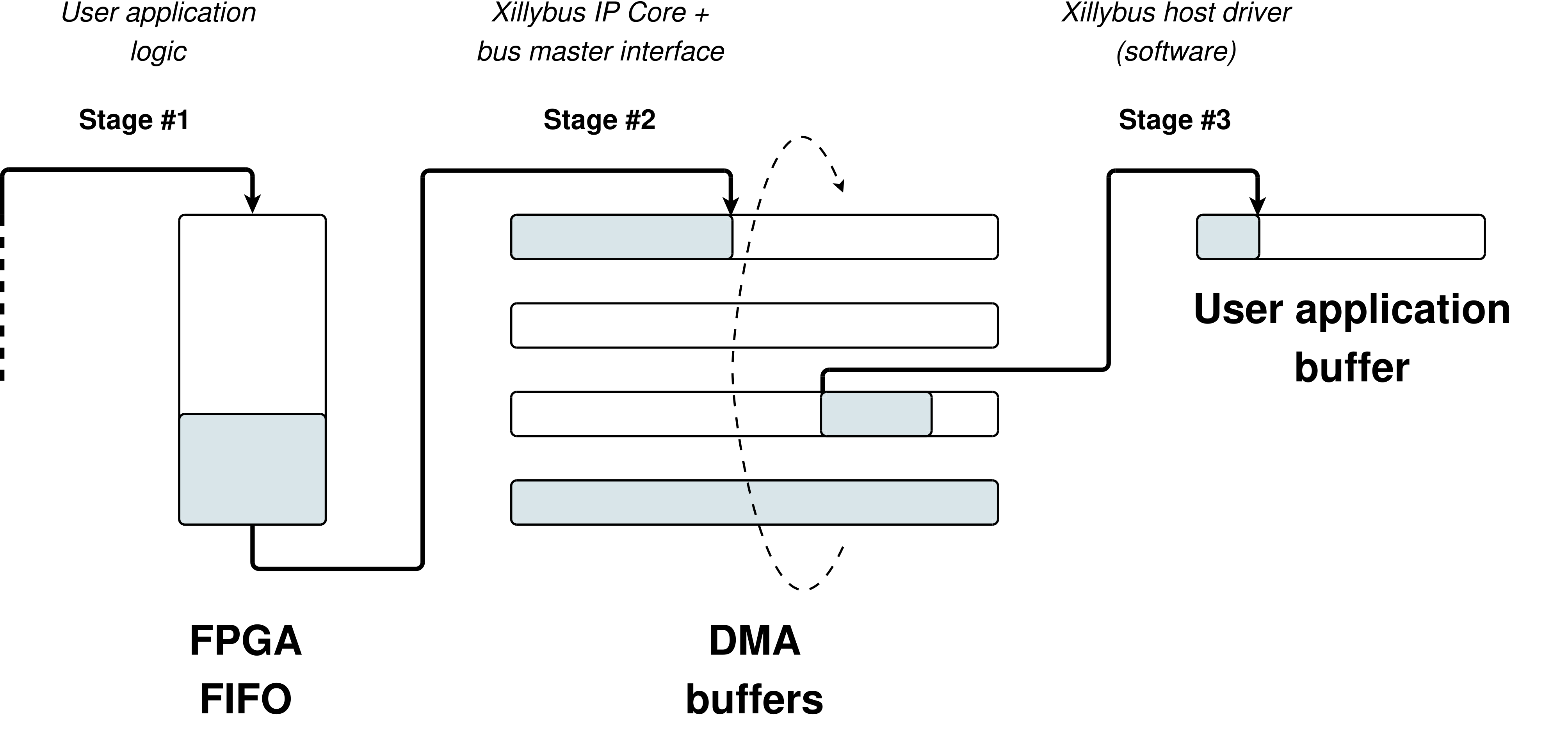
The data flows towards the host in three stages, as detailed next.
A.3.2 Stage #1: Application logic to intermediate FIFO
The user application logic in the FPGA pushes data into the FIFO that connects between the user application logic and the Xillybus IP core. There is no requirement on when or how much data is pushed, except for respecting the FIFO’s “full” signal to avoid overflow.
A.3.3 Stage #2: Intermediate FIFO to DMA buffer
In this stage, the Xillybus IP core copies the data from the FIFO to a DMA buffer in the host’s RAM. To accomplish this, the core uses some bus master interface (PCIe, AXI4 etc) to write data directly to the host’s memory, without the intervention of the host’s processor.
A pool of DMA buffers is allocated in the host’s RAM. The lifecycle of each DMA buffer is like in many similar settings: In the beginning, all DMA buffers are empty and conceptually belong to the hardware. The hardware writes data to the buffers in a round-robin manner: When it has finished writing to a certain buffer, it informs the host that the buffer is ready for use (the buffer is handed over to the host, so to speak), after which it continues to write to the following buffer. The host may then consume the data in the buffer handed over to it, after which it informs the hardware that the buffer can be written to again (the host returns the buffer to the hardware).
The data flow of stage #2 is controlled by the FIFO’s “empty” signal and by the availability of space in the pool of DMA buffers. When the Xillybus IP core senses a low “empty” signal from the FIFO, and there is space left in some DMA buffer, it fetches data from the FIFO and writes it into a DMA buffer. When the FIFO becomes empty again, or there is no space in any DMA buffer, the IP core’s internal state machine stops fetching data momentarily, and then continues from where it left off in the DMA buffer.
While the data flow is stalled, the IP core might be busy with other activities, for example copying data on some other stream’s behalf (i.e. draining another intermediate FIFO). As a result, there might be a random delay between the time that the FIFO changes the “empty” signal to low, and the resumption of fetching data from it. This delay varies, but overall, the IP core guarantees that a FIFO of 512 words will not reach a state of overflow (as long as the average rate is within limit).
Each DMA buffer may be filled completely before handing it over to the host, or may be submitted to the host partially filled. The conditions for handing over a partially filled buffer are detailed later (section A.3.5), as they require some understanding of the software’s behavior.
The case of synchronous streams is quite similar, except that the Xillybus IP core waits for an explicit request for a certain amount of data before fetching data from the intermediate FIFO.
A.3.4 Stage #3: DMA buffer to user software application
This stage is implemented on Xillybus’ driver on the host by responding to read() system calls (or the counterpart IRPs on Microsoft Windows). According to the well-established API, the read() request includes a buffer that is supplied by the user application, as well as the size of the buffer, which is also the maximal number of bytes to read. The function call may return after reading the maximal number of bytes (complete fulfillment) or less.
The driver starts by checking the DMA buffers that are handed over to it, to determine whether there is enough data for consumption in the DMA buffers to allow for a complete fulfillment of the read() request. If so, it copies the data to the user’s buffer, possibly returning DMA buffers to the hardware, and returns from the system call.
Otherwise, the standard API for a read() function call allows the driver to either return with less than the number of requested bytes, or wait (sleep) for any period of time. The driver is designed not to return too often with little data (which may cause a lot of read() function calls with little data each, hence wasting CPU cycles), but also to avoid unnecessary latency. The dilemma is what to do if there is less data in the DMA buffers than required by the read() function call: To return with a partial fulfillment or wait (and how much to wait).
The chosen strategy is to wait for up to 10 ms for more data, and then return with whatever was available (or wait indefinitely if no data is available, as the standard API requires). This results in a fairly responsive return time, but limits the overhead to 100 read() function calls per second, if the read() function caller requests more data than is available all the time.
This is not to say that read() function calls necessarily have a latency of 10 ms: If the user space application knows in advance how many bytes should be ready, it may request no more than that number. By doing so, it ensures a latency which is on the order of microseconds.
There is however a tricky part: The host knows about the DMA buffers that have been handed over to it, but there may be a partially filled DMA buffer, which the host isn’t aware of. So it might be that there actually is enough data to fulfill a read() function call completely, if the partially filled DMA buffer is taken into consideration.
In order to handle this case properly, the driver checks whether the missing number of bytes would fit into a partially filled buffer. If this is indeed the case, it informs the hardware how much data will be enough. The driver then starts the 10 ms wait. This gives the hardware a chance to immediately send a partially filled buffer, if it indeed allows completing the read() function call entirely.
If and when the partially filled buffer reaches the necessary amount (possibly right away), the hardware hands it over to the host, which then completes the read() function call immediately.
When the 10 ms period is over, the driver returns with as much data as it has available. If there is no data at all, the driver sends a request to the hardware to pass any partially filled buffer it has. The purpose is to return as soon as there is any data, since the 10 ms period is already over.
In all situations, when a DMA buffer has been consumed completely, the driver returns it to the hardware (i.e. informs the hardware that it can be written to again).
A few words on synchronous streams: The flow is the same in principle, except that data is never available in the DMA buffers when the read() function call is invoked. This is because the hardware is allowed to copy data from the FPGA’s FIFO only when it’s instructed to. Accordingly, the read() function call for synchronous streams involves informing the hardware on the amount of data it should copy. The waiting mechanism remains the same: First 10 ms, and then require any partially filled buffer.
A.3.5 Conditions for handing over partially filled buffers
The cases for handing over partially filled buffers can be deduced from the above, and are listed here for convenience.
The general rule is that a partial buffer is handed over to the host if the hardware has been informed that such early submission will result in an immediate return of the read() function call, which happens in any of three conditions:
-
The host is currently handling a read() function call, which will be fulfilled completely when the current partially filled buffer is handed over.
-
A read() function call stands at zero bytes, and has reached the time limit (i.e. 10 ms).
-
On synchronous streams only: When the hardware has completed fetching the amount requested by the host.
Note that when the FIFO becomes empty, it’s not, by itself, a reason for a DMA buffer submission.
A.3.6 Examples
Let’s consider the following simple case of an 8-bit asynchronous stream. Suppose that a stream starts with not containing any data, after which the FIFO is filled with a single element (that is, one byte). The application program on the host then calls the read() function, requesting one byte. This is a possible chain of events:
-
The Xillybus IP core detects the low “empty” signal, and hence fetches a single byte from the FIFO, after which it becomes empty again.
-
The byte is written, with DMA, to the first position in the DMA buffer. The host isn’t notified, as the buffer isn’t full.
-
A read() function call is invoked on the host, requesting one byte.
-
The driver has no DMA buffer to take data from: The only DMA buffer containing data (one byte) is only known to the hardware.
-
The driver detects that the amount of data it needs is less than a DMA buffer’s size, and therefore tells the hardware to hand over a partially filled buffer, if it has at least one byte.
-
The driver starts a 10 ms sleep, waiting for something to happen.
-
The hardware responds immediately by handing over the partially filled buffer to the host.
-
The driver wakes up immediately, copies the requested one byte into the buffer that was supplied with the read() function call, and returns.
This simple example demonstrates how a read() function call returns virtually immediately, even though the data’s size was significantly smaller than the DMA buffer.
Let’s look at the example again, with one small difference: The read() function call requests two bytes, even though only one is written to the FIFO. The sequence is as follows.
-
The Xillybus IP core detects the low “empty” signal, and hence fetches a single byte from the FIFO, after which it becomes empty again.
-
The byte is written, with DMA, to the first position in the DMA buffer. The host isn’t notified, as the buffer isn’t full.
-
A read() function call is invoked on the host, requested two bytes.
-
The driver has no DMA buffer to take data from: The only DMA buffer containing data (one byte) is only known to the hardware.
-
The driver detects that the amount of data it needs is less than a DMA buffer’s size, and therefore tells the hardware to hand over a partially filled buffer, if it has at least two bytes.
-
The driver starts a 10 ms sleep, waiting for something to happen.
-
The hardware does nothing, as it has only one byte in the DMA buffer, but two were requested.
-
The driver wakes after 10 ms, having nothing. It sends a request to the hardware to hand over a partially filled buffer as soon as possible, unless it’s empty.
-
The hardware responds immediately by handing over the partially filled buffer to the host.
-
The driver wakes immediately, copies the one byte requested into the function caller’s buffer, and returns.
This second example shows the consequence of asking for two bytes when there was actually only one: The function call returns only after 10 ms, with one byte. Note however that this delay is unnoticed in most practical scenarios.
A.3.7 Practical conclusions
-
Even if the application-level data always consists of chunks of N bytes, there is no reason to adapt the DMA buffer size in any way. The user application software just needs to make sure that the read() function calls request data amounts exactly as needed, and the partial buffer mechanism will make sure that the function call returns when the data has been pushed into the FPGA’s FIFO, with a very low latency.
-
Even for continuous streams of data, latency can be reduced by making read() function calls with small buffers, at the cost of additional operating system’s overhead. Regardless of the DMA buffers’ size, the latency depends only on the data rate and the number of bytes that are requested in the read() function calls. Reducing the DMA buffer size won’t help, since the read() function call will continue waiting up to 10 ms if it can’t fulfill the read() function call completely.
-
If 10 ms is an acceptable latency, there is no point in optimizing, as the read() function call is guaranteed to return after this time period, unless there is no data at all to return with.
A.4 Host to FPGA (downstream)
A.4.1 Overview
The figure below depicts the data flow in the host to FPGA (downstream) direction. The shaded areas represent data that is yet to be consumed, in the respective storage elements.
In this example, four DMA buffers are shown, even though the number of these can be configured in the IP Core Factory.
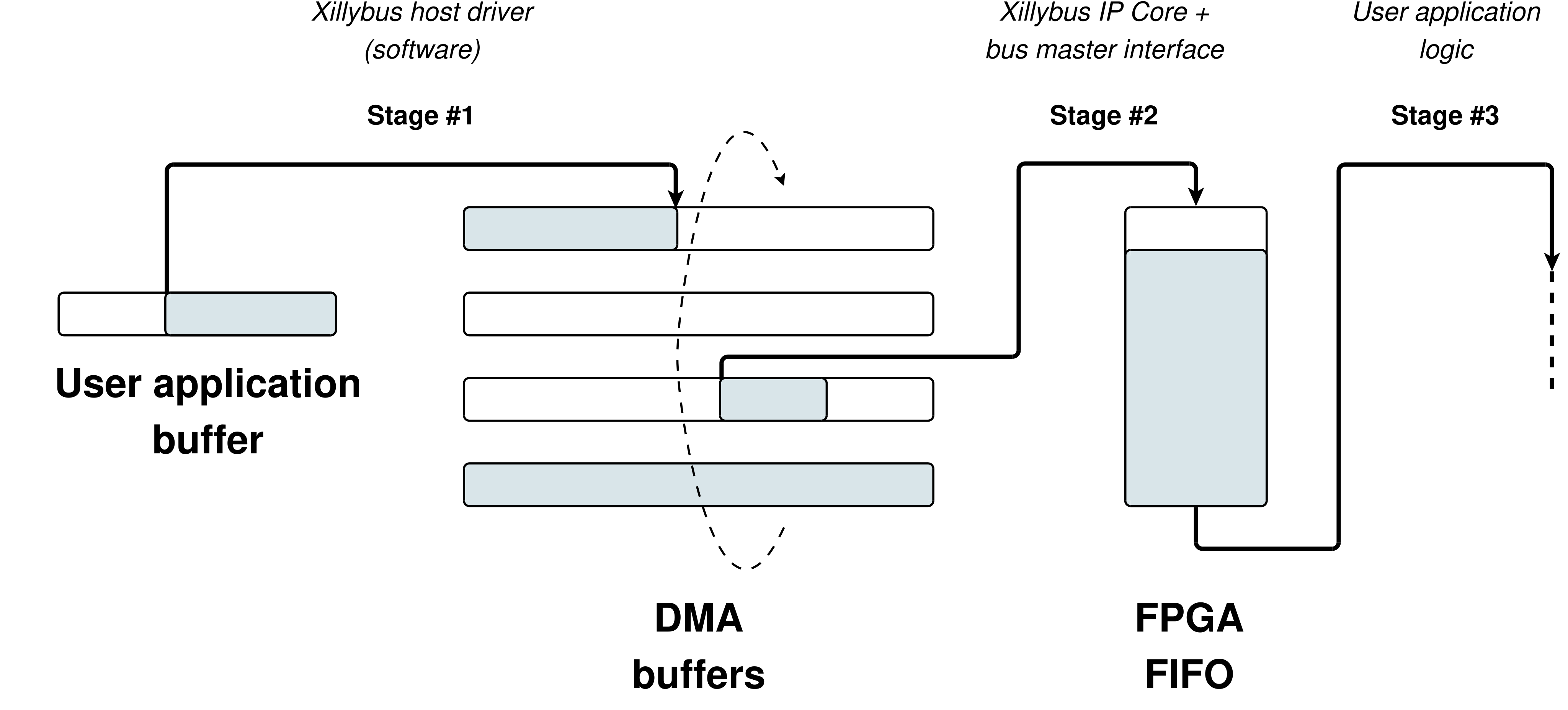
As before, the data flows from the host to the FPGA in three stages, as detailed next.
A.4.2 Stage #1: User software application to DMA buffer
This stage is implemented on Xillybus’ driver (on the host) by responding to write() system calls (or the counterpart IRPs on Microsoft Windows). According to the well-established API, the write() system call request includes a buffer that is supplied by the user application, as well as the size of the buffer, which is also the maximal number of bytes to write. The function call may return after writing the maximal number of bytes (complete fulfillment) or less.
A pool of DMA buffers is allocated in the host’s RAM. The lifecycle of each DMA buffer is like in many similar settings: In the beginning, all DMA buffers are empty and conceptually belong to the host. The host writes data to the buffers in a round-robin manner: When it has finished writing to a certain buffer, it informs the hardware that the buffer is ready for use (the buffer is handed over to the hardware, so to speak), after which it continues to write to the following buffer. The hardware may then consume the data in the buffer, after which it informs the host that the buffer can be written to again (the hardware returns the buffer to the host).
Xillybus’ driver responds to write() function calls by attempting to copy as much data as possible into the DMA buffers. When a DMA buffer is filled completely, it’s handed over to the hardware, i.e. the host informs the hardware that the buffer can be consumed, and guarantees not to write to it again before the hardware returns the buffer to the host.
If the driver managed to write at least one byte before running out of DMA buffer space, the write() function call returns with the number of bytes written. Otherwise it waits indefinitely (by sleeping, i.e. “blocking”), until a DMA buffer is made available for writing, and then it writes as much data as possible into the DMA buffer and returns.
Note that if a DMA buffer is partially filled, it’s not handed over to the hardware at the end of the write() function call, so there may be data in one DMA buffer, which the hardware isn’t aware of. A “flush” operation hands over a partially filled buffer, and it takes place in any of the following four cases:
-
An explicit flush, caused by making a write() function call with zero bytes to write. This write() function call returns immediately (i.e. it doesn’t wait for the data to be consumed by the FPGA).
-
An automatic flush is initiated 10 ms after the last write() function call.
-
When the file is closed, a flush occurs. In this scenario, the close() function call waits for up to one second for the data to be fully consumed by the FPGA before returning.
-
On synchronous streams, every write() function call ends with a flush(), which waits indefinitely until the data is fully consumed by the FPGA.
Note that a write() function call with a zero-length buffer forces an explicit flush, making sure that all data that has been written is available to the FPGA. However, it doesn’t give the application software an indication of when the data is consumed by the FPGA. If such synchronization is required, a synchronous stream should be used.
A.4.3 Stage #2: DMA buffer to Intermediate FIFO
In this stage, the Xillybus IP core copies the data from the DMA buffers in the host’s RAM to the FIFO in the FPGA. To accomplish this, the core uses some bus master interface (PCIe, AXI4 etc) to read data directly from the host’s memory, without the intervention of the host’s processor.
The data flow of stage #2 is controlled by the FIFO’s “full” signal and by the availability of data in the pool of DMA buffers belonging to the FPGA. When the Xillybus IP core senses a low “full” signal from the FIFO, and there is data ready in some DMA buffer, it fetches data from the DMA buffer and writes it into the FIFO. When the FIFO becomes full again, or the DMA buffers are empty, the IP core’s internal state machine stops fetching data momentarily, and then continues from where it left off in the DMA buffer pool.
While the data flow is stalled, the IP core might be busy with other activities, for example copying data on some other stream’s behalf (i.e. filling another intermediate FIFO). As a result, there might be a random delay between the time that the FIFO changes the “full” signal to low, and the resumption of data copying. This delay varies, but overall, the IP core guarantees that a FIFO of 512 words is deep enough.
The hardware is of course aware of partially filled DMA buffers, and keeps track of how much data each one contains.
A.4.4 Stage #3: Intermediate FIFO to application logic
The user application logic in the FPGA fetches data from the FIFO that connects between the user application logic and the Xillybus IP core. There is no requirement on when or how much data is fetched, except for respecting the FIFO’s “empty” signal to avoid underflow.
A.4.5 An example
Let’s consider the following simple case of an 8-bit asynchronous stream. Suppose that a stream starts with not containing any data, after which the host’s application writes a single byte to the device file.
The sequence of events is as follows:
-
The driver’s write() function call is invoked with a request to write one byte.
-
As the stream contains no data, clearly there’s space in the DMA buffers. Hence the driver copies the byte into the first DMA buffer and returns.
-
Nothing happens during 10 ms.
-
The autoflush mechanism is triggered after 10 ms, causing the driver to hand over the DMA buffer to the hardware with the information that it contains one byte.
-
The Xillybus IP core reads the byte from the DMA buffer and writes it into the intermediate FIFO.
-
The application logic may read the byte from the FIFO at will.
A.4.6 Practical conclusions
-
Even if the application-level data always consists of chunks of N bytes, there is no reason to adapt the DMA buffer size in any way. The user application software just needs to request a flush of the data, with a write() function call that requests zero bytes, at the end of each chunk. A latency on the order of microseconds is achieved this way.
-
Even for continuous streams of data, latency can be reduced by making write() function calls with small buffers, followed by a flush (write() function call with zero bytes), at the cost of additional operating system’s overhead. Regardless of the DMA buffers’ size, the latency depends only on the data rate and the amount of data between the flush requests.
-
It can make sense to reduce the DMA buffer size if it’s known in advance that a flush always occurs after a given chunk of data, and hence no DMA buffer is ever filled beyond a certain level. However, the only advantage of doing so is saving an amount of RAM at the host, which is unlikely to be significant.
-
If 10 ms is an acceptable latency, there is no point in optimizing, as the autoflushing mechanism kicks in after 10 ms of no activity.